Samsung Galaxy S22+ Charging Port Repair in Al Khobar
Samsung Galaxy S22+ Charging Port Repair in Al Khobar for a loose plug or a phone that won't charge. Your first check is free. We tell you what we found, and you decide before any work starts. If we cannot fix it, you pay nothing.
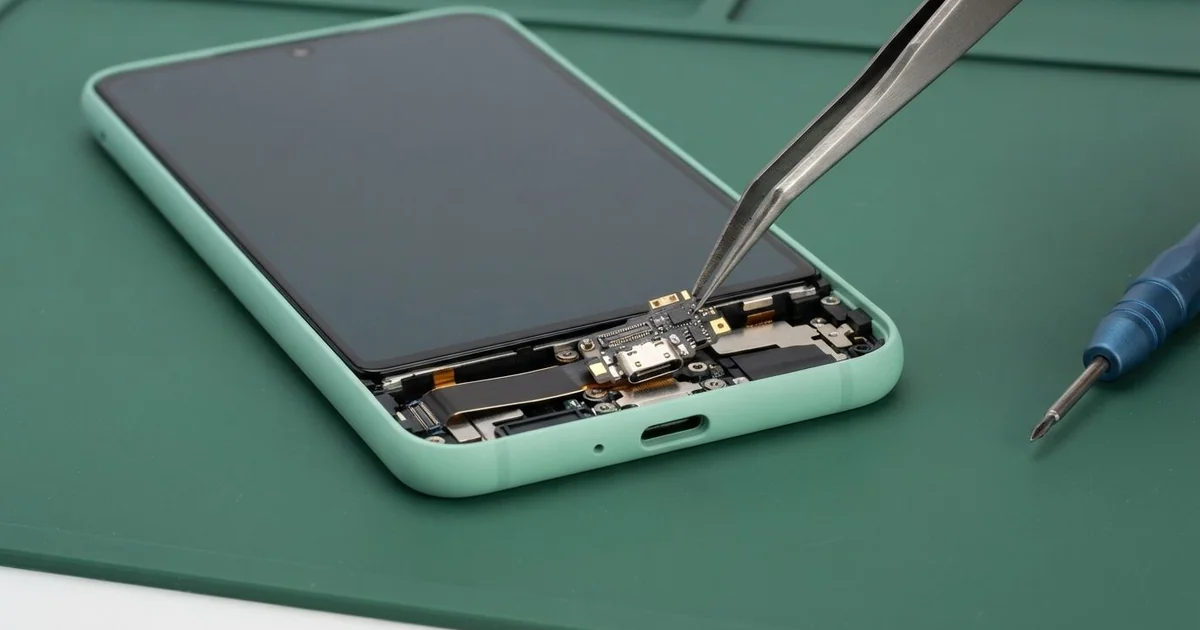
Samsung Galaxy S22+ Charging Port Repair in Al Khobar brings back steady, fast charging. We start with a free check, then clean the port or replace the charging board. We test charging with you, and most jobs are done the same day.
A Samsung S22 Plus not charging rarely fails all at once. Charging gets slower, the plug feels loose, or a moisture warning pops up on a dry day. Sometimes the phone still charges on a wireless pad, but not with any cable.
Waiting makes it worse. Each weak connection heats the pins, and that heat speeds up rust on them. A port that only needed a cleaning can end up needing a new board, and that takes longer.
Lint, sand and dust build up at the back of the port. Or the cable itself is worn out from daily use. We check both, and often a careful cleaning is all it takes.
Plenty of faults are simple, but some are not. The Samsung S22 Plus charging port is part of a small charging board at the bottom of the phone. A thin flex cable joins it to the main board, and burnt or rusted pins mean a new board.
How Kabayan Center Repairs a Samsung Galaxy S22+ Charging Port
We repair these charging problems on this phone.
- A plug that feels loose or drops out
- Charging that is slow, or fast charging that has stopped
- Charging only on a wireless pad, not with a cable
- A moisture warning on a dry phone
- Green or white crust on the pins
- No connection to a computer or wired earphones
Our steps for this repair:
- We try the phone free with our own tested cable and charger.
- We check the port under a magnifier for dirt, crust and bent pins.
- We tell you what it needs, and you decide before any work starts.
- We clean dirt out with plastic picks and a dry brush, never metal.
- For a damaged port, we soften the glue, lift the back and disconnect the battery.
- We fit a new charging board, reconnect its flex cable and reseal the back evenly.
- We test normal charging, fast charging and a computer link with you.
Another phone with the same trouble? See our charging port repair page for other models. Our shop is on King Fahd Road, and customers come from Dammam and Dhahran too.
Why a Galaxy S22+ Stops Charging: 3 Real Cases
Humid sea air and green pins
This one starts on a balcony by the sea. An engineer who lived near the Corniche liked to work outside in the evenings. The phone sat on the table there for hours, often charging through the night.
Humid sea air carries fine salt, even when you can't see or feel it. Over months it settles in the port and turns the pins green. "First it charged slowly, then only sometimes," the engineer told us.
They had searched for Samsung Charging Port Repair in Al Khobar and hoped a cleaning would do. Under the magnifier, three pins were covered in green crust. The metal under the crust was already thin and eaten away.
We fitted a new charging board, and the phone charged normally again. But the rust had crept along the flex cable to its socket on the main board. That socket needed a motherboard repair to clean and re-solder it.
After both jobs, charging worked well, but the computer link stayed weak. The engineer backs up online now, so they chose to leave it. Keep a phone indoors when the air is heavy and damp.
A worn cable, not a worn port
A common mix-up: a student said fast charging had stopped working during exams. The phone took most of the night to fill up, and died by lunch. The student expected to need a new port, and was ready to leave the phone for the day.
The student had searched for mobile repair in Al Khobar and walked in after class. We tested the phone with our own cable and charger first. Fast charging switched on straight away, and the port looked fine.
The student's cable was the problem. Its plug was bent slightly from being carried loose in a bag. The thin wires near the plug had also broken, so it could only pass slow power.
We still looked into the port and found a thin layer of lint. We cleaned it out while the student waited. No part was needed, only a new cable from any good shop.
The phone charged fast again that same afternoon, with the old port. We showed the student how to spot a worn cable. Look for a bent plug, a frayed cover, or a plug that gets hot.
Knocked from a car mount while charging
One evening a phone came in with two problems. A sales rep kept it on a dashboard mount, charging, with the cable bent sharply to one side. On a bumpy road, the phone fell and landed on the plug.
The fall levered the plug hard against the port. "Now it won't charge unless I hold it," the rep said. The screen had also cracked in one corner when the phone hit the gear stick.
We looked at the port under a bright light first. The metal shell around it was bent, and the port had lifted off the charging board. Cleaning could not fix a bent port like that, so we opened the back.
We replaced the charging board, and the plug clicked in firmly again. For the crack, the rep also asked for a phone screen replacement, since touch had stopped working near that corner.
The phone now charges and responds to touch normally again. We suggested a mount that holds the phone upright, so the cable goes straight down. A short, flexible cable also puts less strain on the port.
How to Keep Your Galaxy S22+ Charging Port Healthy
- Charge indoors, away from damp sea air on balconies and near the beach.
- Look into the port with a torch from time to time, and brush out lint gently.
- Use a cable in good shape. Replace it when the plug bends or the cover frays.
- Let the cable go straight into the phone, with no sharp bend at the plug.
- Wait for a moisture warning to clear. Don't force charging with another cable.
- Bring it for phone repair in Al Khobar when charging turns slow, before the pins rust through.
Related services
- Phone battery replacement for a phone that drains fast even with good charging
- Water damage repair for a phone that got wet or keeps showing a moisture warning
Questions about this repair
Ask us anything else on WhatsApp
we answer during shop hours.