Samsung Galaxy S22+ Motherboard Repair in Al Khobar
Samsung Galaxy S22+ Motherboard Repair in Al Khobar for a phone that won't start or gets hot. We check it free and show you what failed. You decide before any work starts, and if we cannot fix it, you pay nothing.
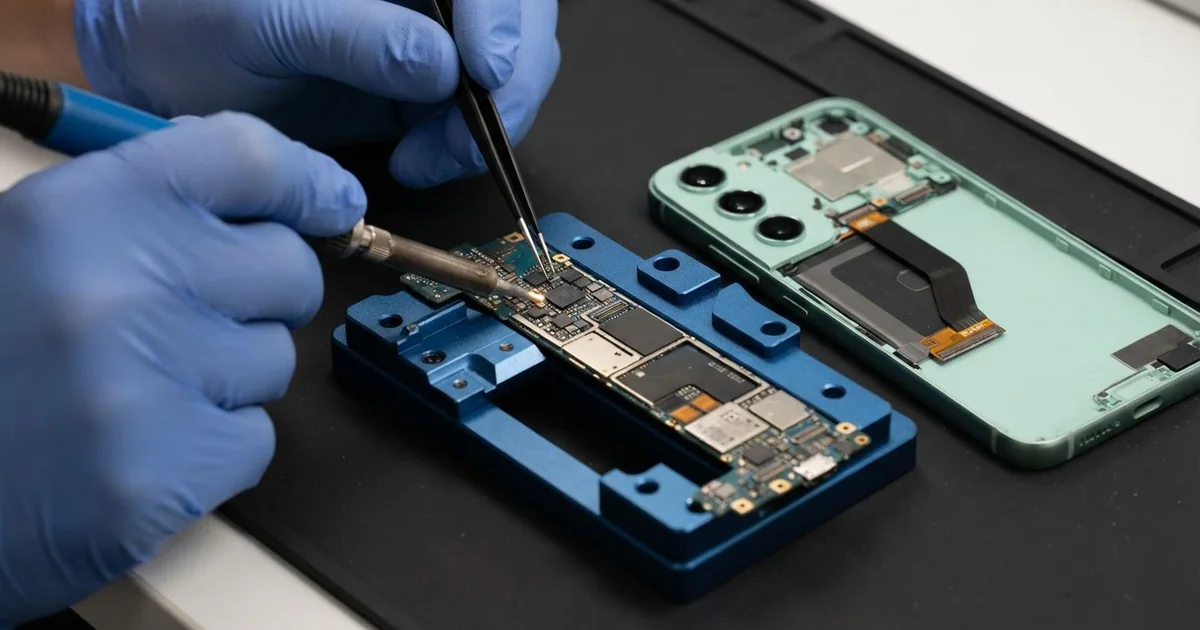
Samsung Galaxy S22+ Motherboard Repair in Al Khobar fixes phones that won't start or keep dying. We check the phone free and find the short or the failed part on the board. Then we fix it and test power, charging and signal before you take it home.
You usually notice it suddenly. A Samsung S22 Plus not turning on shows nothing, not even a charging sign. Some phones get warm in your hand while the screen stays black.
Other phones start, then freeze and restart again and again at the logo. We call that a boot loop. Sometimes the signal or the sound also disappears without any clear reason.
It's better not to wait. A short circuit means power leaks to the wrong place, and that place gets hot. Liquid on the board keeps working its way in, and rust spreads slowly under the chips.
The motherboard is the main board that holds the chips, so it controls everything. Not every dead phone has a board fault, though. A worn battery or a blocked port can look the same, so we check those first.
When the board is at fault, most jobs mean fixing one small part, not a new board. We tell you what we found, and you choose what happens next.
How Kabayan Center Repairs a Samsung Galaxy S22+ Motherboard
These are the faults we fix on the Samsung S22 Plus motherboard.
- No power, no vibration and no charging sign
- A boot loop that keeps the phone stuck at the logo
- A board that gets hot while the screen stays black
- Charging that stops after heavy use on the charger
- Sticky marks, rust or crust on the board after a spill
- A short left behind by a loose screw or an earlier repair
Here is how a board repair works with us, step by step.
- We check the phone free and test the battery, charger and port first.
- We explain what we found, and you decide before any work starts.
- We warm the glued back, lift it slowly and disconnect the battery.
- We feed the board safe, measured power and read each power line with a meter.
- We use a heat camera or freeze spray to find the part that gets hot.
- We replace that part or set its solder again, then clean the whole area.
- We test calls, charging, cameras and sound, then close the phone with fresh glue.
Same fault on a laptop or a different phone? Our motherboard repair service handles those too. Many customers drive to our shop on King Fahd Road from Dammam and Dhahran.
How a Galaxy S22+ Board Stops Working: 3 Real Cases
Juice leaked inside a gym bag
A common case: a bottle of juice opened inside a gym bag. The phone sat at the bottom of the bag for the whole workout. When the owner found it, the screen was already black.
"I dried it with a towel and put it in rice," the owner told us. Rice feels safe, but it doesn't reach inside the phone. The sugar in juice stays on the board and turns sticky.
They came in later, after searching for mobile repair in Al Khobar. Inside, sticky brown marks covered the area around the power chip. Some of the tiny parts had already turned green with rust.
We cleaned the board in a cleaning bath, the same way we do a water damage repair. Then we replaced the burnt parts near the power line. The phone started, but only for short moments.
The storage chip area was too badly damaged to run the phone every day. So we used those short moments for data recovery and copied the photos out. The phone itself could not be saved, but the family photos went home safe.
Long gaming sessions on the charger
We often see this with students. One played games for hours in a warm room, with the phone plugged in the whole time. The back became too hot to hold, and one night the phone died.
The student had looked up Samsung Motherboard Repair in Al Khobar the next morning, still hoping for a small fix. Games push the chips hard, and charging adds even more heat. Doing both for hours stresses the charging chip most of all.
With the heat camera, we saw the charging chip glow bright as soon as power reached it. It had a short inside, so we replaced it with a new one. The rest of the board measured normal, which was good news.
The port had also loosened from being plugged and pulled so often during play. So we did a charging port repair while the phone was open. After that, it charged normally and ran cool again, even during a long test.
Don't play heavy games while the phone is charging. Let it charge first, then play without the cable. The student now takes breaks, and the phone stays much cooler.
A loose screw from an earlier repair
One afternoon a phone came in that had died a few weeks after a screen repair somewhere else. The owner, an office worker, heard a small rattle when shaking it. That sound was the first clue to what went wrong.
Inside, a tiny screw had come loose and was sitting across the board. Metal on the board can join two points that should never touch. That creates a short, and the phone shuts off to protect itself.
The screw had touched a power line more than once. It left a small burnt mark and damaged one tiny part beside it. Luckily, the damage stayed in that one small spot.
We removed the screw, replaced the burnt part and cleaned the area. Then we fitted every screw back in its right place and checked each one. We also tested the board with safe power for a long time.
The phone started normally and all the files were still there. The office worker was happy to hear the rattle was gone too. A rattle inside a phone is never normal, so bring it in early.
How to Keep Your Galaxy S22+ Board Healthy
- Keep drinks and the phone in different pockets of your bag.
- Switch off a phone that got wet, and skip the rice. Bring it in the same day.
- Charge first and play later, so the chips don't overheat.
- Shake the phone gently after any repair. A rattle means something is loose.
- Back up your photos every week, so a dead board never takes them.
- Take it for phone repair in Al Khobar when it gets hot with the screen off.
Related services
- Phone battery replacement for a phone that drains fast or shuts down early
Questions about this repair
Ask us anything else on WhatsApp
we answer during shop hours.