Samsung Galaxy S22 Ultra Motherboard Repair in Al Khobar
Samsung Galaxy S22 Ultra Motherboard Repair in Al Khobar for a phone that won't switch on. It may also restart again and again or show no signal. We check your phone free and tell you what it needs. You decide before any work starts, and we delete nothing without asking.
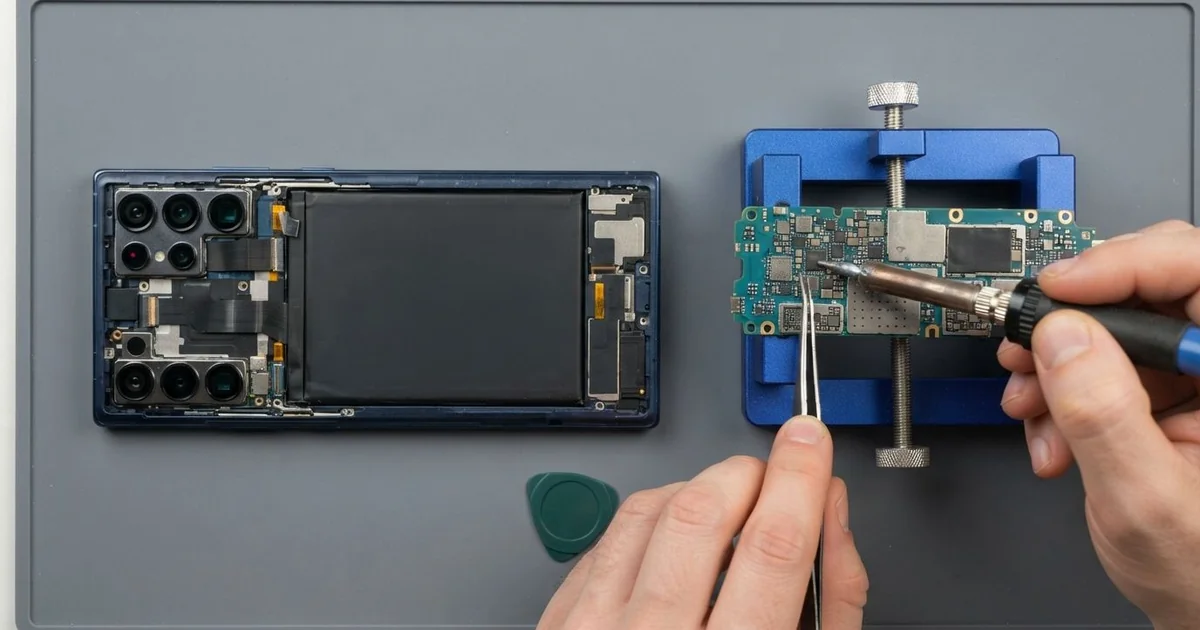
Samsung Galaxy S22 Ultra Motherboard Repair in Al Khobar brings back a dead, frozen or signal-less phone. We check the board free and find the one part that failed. Then we repair that faulty part and test calls, charging and the S Pen before you take it home.
A Samsung S22 Ultra not turning on is the sign we see most. The screen stays black, even on the charger, and nothing vibrates. Other phones freeze on the logo, lose signal, or get warm while sitting on the table.
It's better not to wait. A small short on the board keeps making heat, and that heat can harm the parts around it. If the phone gets hot while it's switched off, unplug it at once.
Not every dead phone has a bad board. A worn battery, a blocked charging port or a failed update can look exactly the same. We rule these out first, so you only pay for the work the phone really needs.
When the Samsung S22 Ultra motherboard itself is at fault, we look for the exact spot that failed. Often it's one small chip, a burnt part or rust on a connector. We repair or replace that part, instead of changing the whole board, and your files stay on the phone.
How Kabayan Center Repairs a Samsung Galaxy S22 Ultra Motherboard
These are the board faults we fix on this phone.
- No power at all, even on a charger that works
- Stuck on the logo, or restarting in a loop
- No signal or "No service" after a drop
- The phone gets hot near the cameras while doing nothing
- Charging that stops, or a phone that only runs on the cable
- Rust on the board after water got inside
Here is how a Samsung Galaxy S22 Ultra motherboard repair works with us, step by step.
- We check the phone free with a battery and charger we know are good, so the board is the only question left.
- We measure how much power the board pulls, which tells us if there is a short.
- We tell you what we found, and you decide before the repair starts.
- We warm the back glass, lift it slowly, disconnect the battery and take out the board.
- Under a microscope we find the hot spot, the burnt part or the rust.
- We replace the faulty chip or part and clean the area around it.
- We refit the board, renew the water seal and test calls, signal, charging, cameras and the S Pen.
Own another phone or a laptop with a board fault? Our motherboard repair service covers those too. Customers come to our shop on King Fahd Road from Dammam and Dhahran as well.
Why a Galaxy S22 Ultra Stops Turning On: 3 Real Cases
Long games in a hot car
This one starts in a parked car in summer. A young worker played long games on the phone during lunch breaks, with the engine off and the windows closed. One afternoon the screen went black and never came back.
"It was very hot, then it just died," the customer told us. They had searched for Samsung Motherboard Repair in Al Khobar from a friend's phone. Heavy games push the chips hard, and a closed car in summer adds even more heat.
On the bench, the board pulled far too much power, which means a short. Under the microscope we found a small burnt part next to the power chip. That chip shares power across the whole board.
We replaced the burnt part and cleaned the area. The phone started on the first try, and the photos and chats were all there.
The heat had hurt the battery too. It was slightly puffed and lost charge fast, so we also did a phone battery replacement. Now the customer plays in the shade with a cooler case, and the phone stays warm instead of hot.
Dropped in a compound pool, then charged
A customer came to us after the phone slipped into a compound swimming pool. It came out in seconds and still worked.
That evening, the owner put it on the charger overnight, just to be safe. "I thought charging would help it dry," they told us later.
By morning the phone would not turn on. Charging a wet phone sends power through the water inside, and that speeds up rust fast. We see this often with phones that looked fine at first.
When we opened it, green and white crust covered one corner of the board. We cleaned it and began a water damage repair. Some tiny connections under the main chip had already rusted through.
The board was too far gone to ever work as a phone again. We told the customer honestly before doing anything more with it. The photos mattered most, because they were family pictures from years abroad.
We kept the board alive on the bench just long enough for data recovery. The photos and contacts came back safely, and the customer moved them to a new phone.
A failed update that looked like a dead board
We often see this: a phone that restarts again and again after an update. A teacher brought one in, sure the board had died for good. "It shows the logo, then goes black, then the logo again," the teacher said.
The teacher had been looking for mobile repair in Al Khobar and expected bad news. The update had stopped halfway because the battery ran low.
That left the phone's software broken, not the board. A low battery during an update is a common cause of this loop.
We checked the board first anyway. The power draw was normal and there was no heat, no rust and no short. So the Samsung Galaxy S22 Ultra motherboard repair was not needed at all.
We reloaded the software with a computer and kept the teacher's files in place. We asked before touching anything, and we deleted nothing. The whole job took far less time than a board repair would.
The phone started normally, and the S Pen worked again too. Now the teacher charges the phone before every update and waits for it to finish.
How to Keep Your Galaxy S22 Ultra Board Healthy
- Keep the phone out of a closed car in summer, even for a short time.
- Take breaks during long games, and remove a thick case if the phone gets hot.
- Never charge a phone that has been in water. Switch it off and bring it in.
- Charge the battery before a big update, and let it finish without stopping it.
- Use a good charger and cable, since a poor one can send too much power.
- Back up photos and chats often, so a board fault never costs you your files.
- Take it for phone repair in Al Khobar at the first sign of heat or sudden restarts.
Related services
- Charging port repair for a phone that charges loosely or not at all
Questions about this repair
Ask us anything else on WhatsApp
we answer during shop hours.