Samsung Galaxy S23+ Motherboard Repair in Al Khobar
Samsung Galaxy S23+ Motherboard Repair in Al Khobar for a phone that won't turn on or keeps restarting. We check it free, even after water damage, and tell you what it needs. If we cannot fix it, you pay nothing.
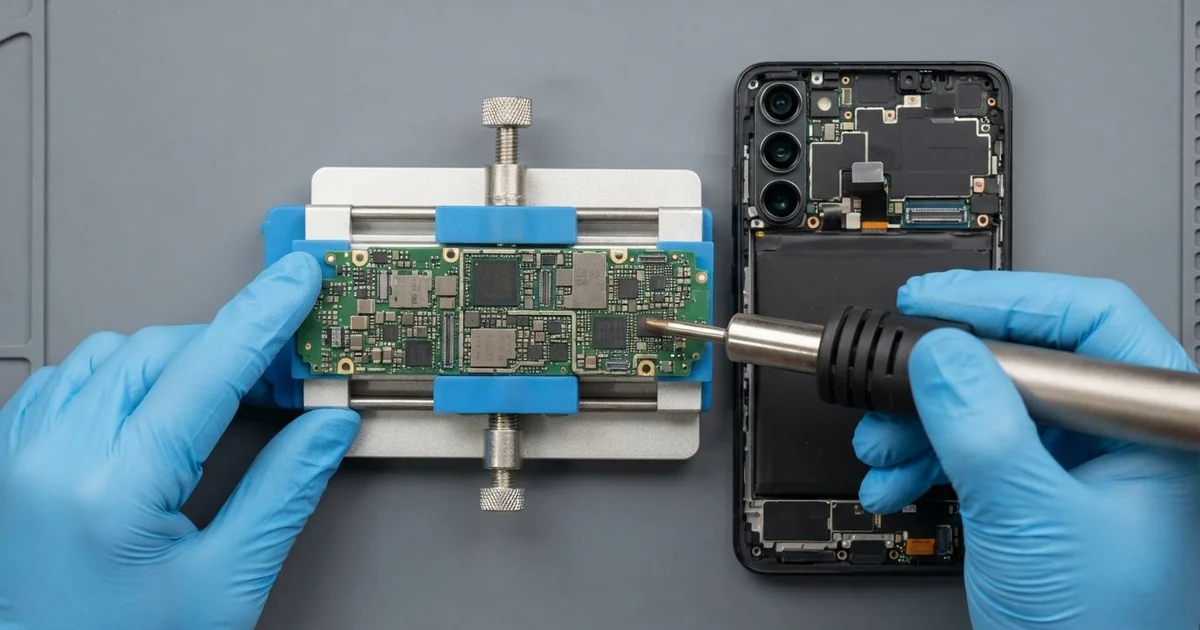
Samsung Galaxy S23+ Motherboard Repair in Al Khobar brings back a phone that is dead, stuck or shorted. We check it free, find the faulty part on the main board and repair it under a microscope. We keep your data safe, and we test every function before you take it home.
A Samsung S23 Plus not turning on is the most common sign of a board fault. The screen stays black, even on the charger. Other phones get stuck on the logo, restart in a loop or get hot while they do nothing.
It's better not to wait. A short circuit keeps heating the board while the battery is connected. Water leaves minerals that turn to rust, and rust spreads to the parts around it.
Not every dead phone has a bad board. A fully flat battery, a faulty charger or a broken screen can look the same. So we test those first, and sometimes the fix is much smaller and quicker.
When the board is the problem, we repair it rather than swap it. The Samsung S23 Plus motherboard holds tiny parts for power, charging and signal. We find the one that failed, replace it and clean the area around it.
How Kabayan Center Repairs a Samsung Galaxy S23+ Motherboard
We fix these board faults on the S23+.
- A phone that is completely dead, even on the charger
- Restart loops or a phone stuck on the logo
- A board that gets hot with the phone switched off
- Rust and short circuits after water, sweat or a spill
- No signal, no Wi-Fi or no sound after a drop
- Torn or burnt connectors from an earlier repair
This is how the work goes on the bench:
- We check the phone free and test the battery, charger and screen first.
- We warm and lift the back glass, then unplug the battery before touching the board.
- We measure the power lines on the board to find the short or the missing voltage.
- We tell you what we found and how likely the fix is, and you decide.
- We clean rust away and replace the failed part under a microscope.
- We power the phone and test calls, charging, cameras, Wi-Fi and the fingerprint sensor.
- We fit a fresh water seal, close the back and let you check it yourself.
Own a different phone or a laptop? Our motherboard repair service covers those too. Customers come to our shop on King Fahd Road from Dammam and Dhahran as well.
Why a Galaxy S23+ Board Fails: 3 Real Cases
Washed in a trouser pocket
This one starts in a washing machine. A teacher forgot the phone in a trouser pocket, and it went through a full wash. "It was on when I found it, then it just died," the teacher said.
The phone's seal keeps out a splash, but not hot soapy water that spins for a long time. Then the teacher did what many people do, and put it on charge to test it. Charging a wet phone pushes power through the water, and that burns small parts.
We opened it and found white crust around the power parts and a burnt spot near the battery connector. We started with a full water damage repair clean, then replaced the burnt parts.
The phone came back on, but the signal part of the board was too far gone. It could use Wi-Fi, but it couldn't make normal calls.
The teacher's first worry was the photos and school files. We moved them all to a new phone with our data recovery service. The old phone now works at home on Wi-Fi only, and nothing important was lost.
A swollen battery shorted the board
We often see this after a phone has worked very hard for a long time. A security guard used the phone on long night shifts, always on charge in a hot guard room. One night it switched off and never came back.
"The back feels puffy and it won't turn on," the guard told us. The guard had searched for Samsung Motherboard Repair in Al Khobar, sure the phone was finished.
Inside, the old battery had swollen and pressed hard on the board. The pressure had shorted one of the power parts next to the battery connector. So we replaced that part and cleaned the board.
We did not reuse the swollen battery, because it could catch fire. We did a phone battery replacement in the same visit. Then the phone started normally and passed every test.
The guard now charges in a cooler spot and unplugs once the phone is full. The phone runs cool through the night again.
Heat and constant charging are what made that battery swell in the first place. A swollen battery can hurt the board long before it stops working.
A connector torn during a screen job elsewhere
A common case: a phone that worked fine until a quick screen job at another shop. A salon worker had a new screen fitted there. The screen worked for a few hours, then the phone went dark.
The worker had looked for mobile repair in Al Khobar and brought it to us with the receipt. Under the microscope we found the screen connector on the board half torn off. Two tiny pins were missing, and one was touching its neighbour.
The shop had forced the cable in at an angle. That kind of damage does not heal by itself. We rebuilt the missing pins, fixed the connector back on and cleaned the area.
Then we tested the screen, the touch and the fingerprint sensor. Everything worked, and the Samsung Galaxy S23+ motherboard repair saved the new screen too.
The phone has worked normally ever since. We suggested asking any shop to unplug the battery first, before a screen job.
A torn connector is small, but it can stop the whole phone. Fixing it early kept the damage from spreading to the parts next to it.
How to Keep Your Galaxy S23+ Board Safe
- Never charge a phone that got wet. Switch it off and bring it in.
- Don't put a wet phone in rice or under a hair dryer. Both leave the water inside.
- Check your pockets before a wash, every time.
- Stop using the phone if the back starts to lift or feel soft.
- Charge in a cool place, and unplug once the phone is full.
- Back up your photos and files often, so a dead board never costs you them.
- Choose phone repair in Al Khobar at a shop that unplugs the battery before any work.
Related services
- Charging port repair for a phone that turns on but won't charge
Questions about this repair
Ask us anything else on WhatsApp
we answer during shop hours.