Samsung Galaxy S23 Ultra LCD Display Replacement in Al Khobar
Samsung Galaxy S23 Ultra LCD Display Replacement in Al Khobar for cracked edges or dead touch. We check your phone free and tell you what it needs. You decide before any work starts, and your photos and chats stay where they are.
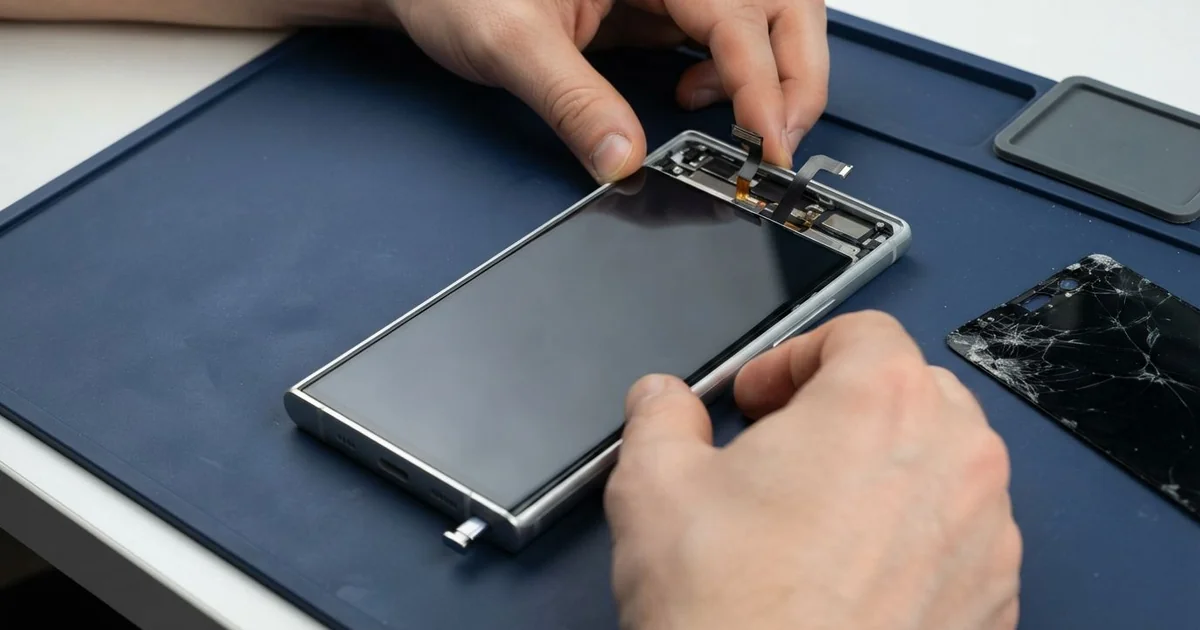
Samsung Galaxy S23 Ultra LCD Display Replacement in Al Khobar fixes cracked or dark screens. We check it free, then fit a complete new screen with the glass and display as one part. We test touch, the S Pen, both edges and the fingerprint sensor, and most jobs finish the same day.
A Samsung S23 Ultra broken screen shows up in several ways. The glass cracks at a curved edge, or a green line runs down the display. Some screens stay black while calls still ring, and others ignore the S Pen.
It's better not to wait. Cracked glass lets in sweat and dust, and the dark spots under a crack keep spreading. Once the screen goes fully black, even a simple photo backup becomes hard.
This phone has an AMOLED screen, a thin bright display that most people call the LCD. Not every fault needs a new one. A lifted screen protector causes false touches, and a loose connector after a drop can turn the screen black.
Cracks, lines, dark patches and burn-in are different. The glass and the display are glued into one part, so the glass can't be swapped alone. A Samsung S23 Ultra screen replacement fits the whole new part.
How Kabayan Center Replaces a Samsung Galaxy S23 Ultra LCD Display
We fix these screen faults on the S23 Ultra.
- Cracked glass, often starting at one of the curved edges
- Green, pink or white lines, or a screen that stays black
- Burn-in, where a faint old image stays on the screen
- Touch or S Pen input that stops working in one area
- A fingerprint sensor that no longer reads through the glass
- A screen lifting from the frame after a drop
Here is how the screen job works, step by step:
- We check the phone free, and note what still works: sound, cameras, charging and the S Pen.
- We tell you what it needs, and you decide before any work starts.
- We warm the curved edges to soften the glue, then open the phone slowly.
- We disconnect the battery, take out the broken screen and clean all old glue from the frame.
- We connect the new screen and test touch, colour, the S Pen and both edges before sealing.
- We seal the screen with fresh glue and press it evenly, so the curved edges don't lift.
- We help you add your fingerprints again, since the sensor works through the new glass.
Own a different model? Our phone screen replacement service covers other phones too. Customers come to our shop on King Fahd Road from Dammam and Dhahran as well.
How a Galaxy S23 Ultra Screen Gets Damaged: 3 Real Cases
Dropped on a marble floor at the mall
A customer came to us straight from a shopping mall. The phone slipped while they were pulling out the S Pen to sign a delivery note. It hit the polished marble floor edge first.
"The side is cracked and the pen writes in the wrong place," they told us. They had searched for Samsung Screen Replacement in Al Khobar while still in the car park.
Curved edges take the hit first in a sideways fall, and marble is very hard. We found a crack along one edge and a dead strip of touch beside it. The Samsung Galaxy S23 Ultra LCD display replacement fixed both, and the S Pen wrote cleanly again.
During the final test, the zoom camera photos looked hazy. The small camera glass had cracked in the same fall. So we also did a phone camera repair, and the photos were sharp again.
The customer now keeps the phone in a case with a raised edge. That lip takes the hit before the curved glass can. The S Pen now comes out over a table, not over a hard floor.
Burn-in from a map that never switched off
We often see this one: a screen that shows a ghost of an old image. A delivery rider used the phone on a handlebar mount for maps, all day and at full brightness.
"I can see the map even when I watch a video," the rider said. The rider had looked for mobile repair in Al Khobar between orders. An AMOLED screen ages where it shows the same bright image for hours, and that leaves burn-in.
We showed the rider the faint outline of the map bar and the clock. Burn-in doesn't wash out, so only a new screen clears it. The touch and colour still worked fine, though.
The rider chose to wait and keep the screen for now. We also tested the battery, and it was badly worn from charging on the bike in the heat. We did a phone battery replacement instead.
The ghost image is still there, but the phone now lasts a full shift. We suggested dark mode and lower brightness, and the screen can be replaced later.
That was an honest choice. The screen still works, and the burn-in won't spread if the map isn't left on full brightness.
A spilled bottle in a gym bag
This one starts with a tiny crack in one corner. A fitness coach had used the phone like that for weeks, because it still worked fine. Then a water bottle leaked inside the gym bag after training.
Water got in through the crack. By the evening, the screen had a dark patch and was opening apps by itself. The coach had heard that rice dries a phone, and left it in a bowl overnight.
Rice doesn't pull water out from under the screen. We opened it and found moisture marks under the display and white crust near the screen connector. So we did a water damage repair on the board first, and a wet phone should never go on charge.
Once the board was clean and dry, we fitted the new screen. The ghost touches were gone, and the fingerprint sensor read well again after the coach set up the fingerprints again.
The coach now keeps the phone in a separate pocket of the bag. Small cracks get fixed early too, before water finds a way in. A cracked phone is no longer sealed against water.
How to Keep Your Galaxy S23 Ultra Screen Safe
- Use a case with a raised lip, so the curved edges don't hit the floor first.
- Pick a screen protector made for curved screens, so it doesn't lift at the sides.
- Hold the phone firmly when you pull out the S Pen, especially over hard floors.
- Turn on dark mode and lower the brightness when you use maps for hours.
- Keep the phone apart from water bottles in your bag.
- Fix small cracks early, before sweat or water get inside.
- Bring it in for phone repair in Al Khobar at the first green line or dark spot.
Related services
- Charging port repair for a phone that charges loosely or not at all
Questions about this repair
Ask us anything else on WhatsApp
we answer during shop hours.