Samsung Galaxy S24 Charging Port Repair in Al Khobar
Samsung Galaxy S24 Charging Port Repair in Al Khobar for a phone that charges slowly, loosely or not at all. We check the port free and tell you what it needs. You decide before any work starts, and your chats and photos stay on the phone.
Samsung Galaxy S24 Charging Port Repair in Al Khobar fixes a phone that charges slowly or not at all. We check the port free, then clean it or replace the small charging board. We test normal and fast charging, and most jobs are done the same day.
It usually starts small: a Samsung S24 not charging unless the cable is held at an angle. The plug feels loose, or charging stops when you move the phone. Some phones show a moisture warning and refuse to charge at all.
It's better not to wait. A loose plug makes tiny sparks that burn the pins, and the damage grows. A phone that can't charge soon runs flat, and then even a simple backup gets hard.
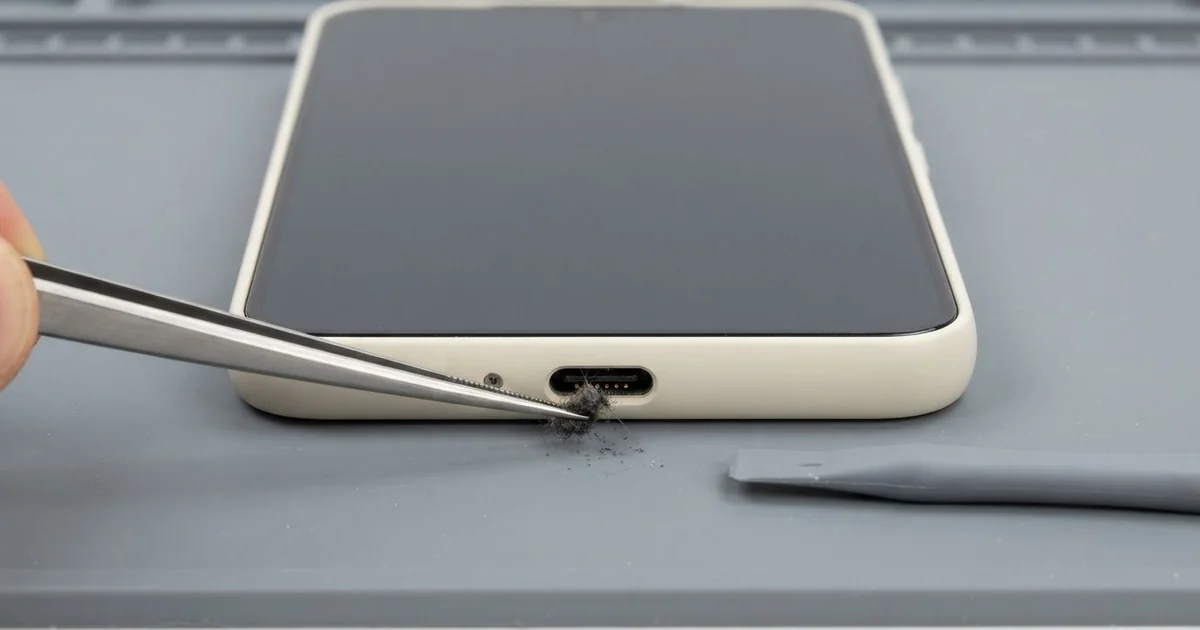
Many ports only need cleaning. Pocket lint and sand pack down at the bottom, so the plug can't go all the way in. We clean it out with plastic tools, never metal, and charging often works again straight away.
Burnt, bent or rusted pins need a new part. On this phone, the Samsung S24 charging port sits on a small board with the microphone. We replace that board and join it to the main board with its flex cable again.
How Kabayan Center Repairs a Samsung Galaxy S24 Charging Port
We fix these charging faults on this phone.
- A cable that only charges when you hold it at an angle
- A loose plug that falls out or never clicks in
- Slow charging, even with a good charger and cable
- A moisture warning when the phone is completely dry
- Charging that starts and stops as you move the phone
- A port that charges but won't connect to a computer
Here is how the repair works, step by step:
- We check the phone free, try our own cable and look inside the port under a bright light.
- We tell you what it needs, a cleaning or a new charging board, and you decide before any work starts.
- If it's dirt, we clean the port with plastic tools and test charging again.
- If the pins are damaged, we warm and lift the back glass, then take out the loudspeaker above the port.
- We unplug the battery, swap the charging board and reconnect its flex cable to the main board.
- We close the back glass with a fresh water-resistant seal.
- We test normal charging, fast charging and the microphone, then you try it with your own cable.
Have a different model? Our charging port repair covers most other phones too. You'll find us on King Fahd Road, and customers bring phones from Dammam and Dhahran as well.
Why a Galaxy S24 Stops Charging: 3 Real Cases
Lint packed down from a pocket
A customer came to us sure the port was broken. The phone lived in a thobe pocket all day at a busy office. "The cable only goes in halfway now," they said.
They had already searched for Samsung Charging Port Repair in Al Khobar and expected a new part. Under our light, the cause was plain to see. A grey layer of lint sat at the bottom of the port, pressed flat by months of plugging in.
Every time the cable went in, it pushed the lint deeper. In the end the plug couldn't reach the pins. We picked the lint out slowly with a thin plastic tool, and the pins underneath were clean and straight.
The plug clicked in fully, and fast charging came back straight away. No new part was needed for the port, only a careful cleaning.
Our check showed one more problem: the phone had run flat so often that the battery health had dropped. The customer chose a phone battery replacement in the same visit. Now the phone lasts a full working day and charges fast again.
Dropped in a puddle during a rainstorm
This one starts on a rare rainy evening. A delivery rider's phone slipped out of a jacket pocket into a deep street puddle. The rider wiped it dry and put it on charge at once, because the battery was low.
The phone showed a moisture warning again and again. A few days later, it stopped charging completely. When we looked in the port with a light, we saw green crust on the pins.
Water had sat in the port while power ran through it, and that turns it to rust fast. Never charge a phone that is still wet. We replaced the charging board, and cable charging worked again.
Inside, though, the wet had travelled further than the port. There were white marks on the main board near the charging connector. So we did a water damage repair, cleaning and drying that part of the board.
Most things came back, but not everything. Wireless charging stayed unreliable, because rust had marked a small part we couldn't fully save. The rider now charges by cable only, and the phone works every day for deliveries again.
Pulled off the sofa by its cable
We often see this in homes with small children. A parent left the phone charging on the sofa arm, with the cable hanging down. A toddler grabbed the hanging cable, and the phone swung down onto the tiled floor.
The parent searched for mobile repair in Al Khobar the same evening. After the fall, the plug wobbled in the port and charging kept cutting out every few minutes. The hard pull had bent the port upward inside the phone.
Cleaning couldn't fix a bent port. We lifted the back glass, took out the loudspeaker and fitted a new charging board. Then we sealed the phone and tested it with a few different cables.
We also showed the parent the old board. Its port was tilted, with two pins pushed out of line.
The tiles had also cracked the screen at one corner, and the crack was spreading. The parent asked for a phone screen replacement at the same time.
The plug now clicks in firmly and stays put. The phone charges on a high shelf these days, well out of reach of small hands.
How to Keep Your Galaxy S24 Charging Port Working
- Check the port with a torch now and then. Clear lint only with a plastic or wooden toothpick, never a pin.
- Keep the phone in a clean pocket, and in a zip bag at the beach or in a sandstorm.
- Dry a wet phone fully before charging, and wait for the moisture warning to go away.
- Pull the plug out by its head, not by the cable.
- Charge the phone out of reach of small children and pets.
- Take it for phone repair in Al Khobar once the plug feels loose, before the pins start to burn.
Related services
- Motherboard repair for a phone that still won't charge after a new port
Questions about this repair
Ask us anything else on WhatsApp
we answer during shop hours.