Samsung Galaxy S24+ Charging Port Repair in Al Khobar
Samsung Galaxy S24+ Charging Port Repair in Al Khobar for a loose plug, slow charging or no charging at all. We check the port free and tell you what it needs. You decide before any work starts, and we delete nothing without asking.
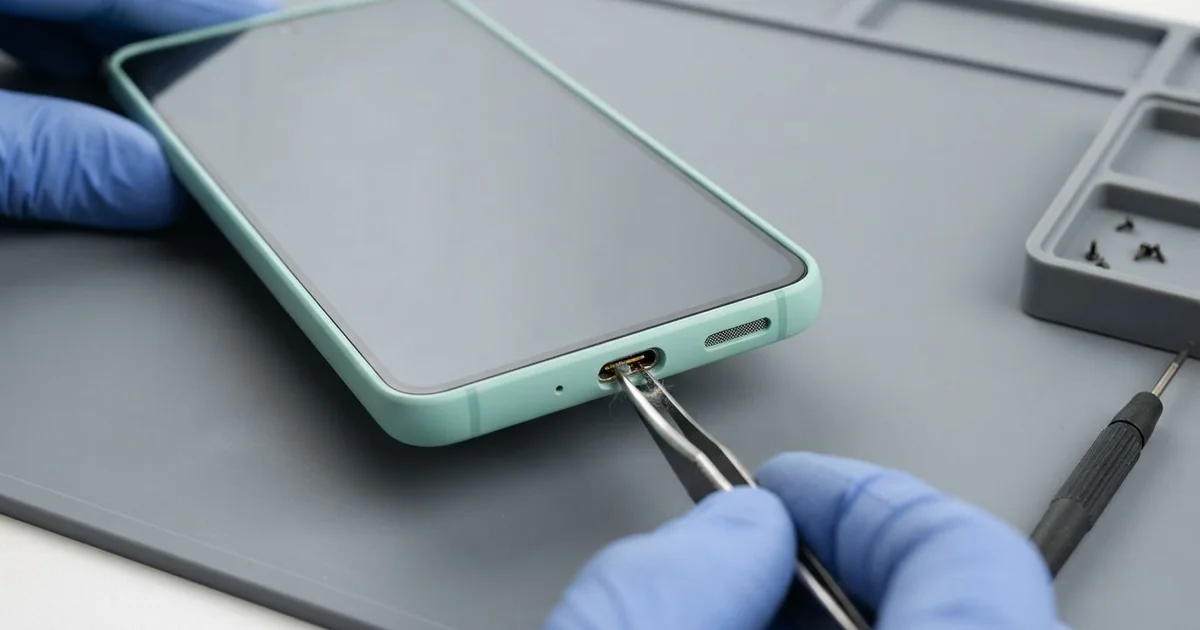
Samsung Galaxy S24+ Charging Port Repair in Al Khobar fixes a phone that charges slowly, loosely or not at all. We check the port free, then clean it or replace the charging board at the bottom. We test fast charging afterwards, and most jobs are done the same day.
Most people notice it at night: the cable goes in, but by morning the battery is still low. Others find their Samsung S24 Plus not charging at full speed any more. Some see a moisture warning even when the phone is completely dry.
It's better not to wait. A plug that moves in the port sparks against the pins, and burnt pins can't be cleaned. Charging at an awkward angle also strains the small board inside the phone.
Many ports only need a careful cleaning. Sand, lint and dust pack into the bottom, so the plug stops short of the pins. We clear it with plastic tools, never metal, and the phone often charges normally again.
Worn, burnt or rusted pins need a new part. The Samsung S24 Plus charging port is built onto a small board at the bottom, with the microphone. We replace that board and connect it to the main board again.
How Kabayan Center Repairs a Samsung Galaxy S24+ Charging Port
These are the charging faults we fix on this phone.
- No charging at all, with any cable or charger
- Super fast charging that stopped working
- A plug that wobbles, or only charges at one angle
- A moisture warning that won't go away
- A port blocked by sand, lint or a broken cable tip
- A muffled microphone on calls, since it sits on the same small board
The repair goes like this.
- We check the phone free with our own tested cable and charger.
- We look inside the port under a microscope and tell you what we see.
- You decide before any work starts, whether it's a cleaning or a new charging board.
- For a cleaning, we clear the port with plastic tools and test it straight away.
- For a new board, we lift the back glass, take out the loudspeaker and unplug the battery.
- We fit the new charging board, connect its flex cable and reseal the back glass.
- We test normal and super fast charging and the microphone, then you try your own cable.
Not an S24+? Our charging port repair fixes most other phones as well. We're on King Fahd Road, and plenty of customers come from Dammam and Dhahran.
Why a Galaxy S24+ Stops Charging: 3 Real Cases
Sand from a day at Half Moon Bay
This one starts on a windy beach day. A family spent the afternoon at Half Moon Bay, with the phone lying on a towel. The wind blew fine sand over everything, and a wave splashed the towel once.
The next evening, the plug wouldn't go in fully and felt gritty. The phone kept showing a moisture warning too. The parent searched for Samsung Charging Port Repair in Al Khobar and came in the same night.
Under the microscope, the port was packed with fine sand. There was also a thin white crust of salt around the edge. We cleared the sand slowly with plastic tools, and the pins underneath were still in good shape.
The salt worried us more than the sand. Salt water leaves crust that turns to rust inside a phone. So we did a water damage repair, opening the phone and cleaning the salt off the board near the port.
The phone now charges at full speed, and the moisture warning is gone. The family takes a zip bag to the beach these days, and the phone stays off the sand.
A magnetic tip left in the port
We often see these little magnetic tips. A warehouse supervisor used a magnetic cable, so a small metal tip lived in the port all the time. It was handy, because the cable just snapped on in the dark.
Over the months, the tip grew loose and charging became slow and hot. Then one day the tip snapped off, and half of it stayed stuck inside the port. The supervisor searched for mobile repair in Al Khobar and brought it in.
We removed the broken piece carefully under the microscope, so the other pins stayed straight. Behind it, some of the pins were burnt black from the loose contact. Cleaning couldn't fix burnt pins, so we fitted a new charging board.
Charging came back at full speed. But months of slow, hot charging had also worn the battery, and it drained before the end of a shift. The supervisor chose a phone battery replacement at the same visit.
Now the supervisor uses a normal cable and plugs it in gently each time. The phone lasts a full shift and charges quickly again, with no heat.
A power surge, and a new port wasn't enough
A customer came to us after the power went out in their building. When it came back, there was a sharp surge, and the phone was charging at the time. After that, it wouldn't charge with any cable.
Another shop had already fitted a new charging port, but it didn't help at all. "The port is new, so why is it still dead?" the customer asked us.
Our tests showed the new port was fine. The surge had damaged the charging chip on the main board. That chip controls power from the port to the battery.
A new port can't fix a fault that sits on the main board. So we did a motherboard repair, replacing the damaged charging chip under the microscope. The phone started charging by cable again, at normal speed, and the battery filled overnight.
The result was only partly what the customer hoped for. Super fast charging didn't come back, because the surge had also damaged a part we couldn't save. The customer was happy to charge a little slower and keep using the same phone every day.
How to Keep Your Galaxy S24+ Charging Port Clean
- Keep the phone in a zip bag at the beach, and never let it lie on the sand.
- Shake out pockets and bags often, because lint collects in the port.
- Avoid magnetic tips that stay in the port. They wear the pins and can snap inside.
- Plug your charger into a socket with surge protection, especially overnight.
- Never push a pin or needle into the port to clean it.
- Take it for phone repair in Al Khobar when charging slows down, before the pins burn.
Related services
- Phone screen replacement for a cracked, dark or unresponsive screen
Questions about this repair
Ask us anything else on WhatsApp
we answer during shop hours.