Samsung Galaxy S24 Ultra Charging Port Repair in Al Khobar
Samsung Galaxy S24 Ultra Charging Port Repair in Al Khobar for a loose cable, slow charging or a moisture warning. We check your phone free and tell you what it needs. You decide before any work starts.
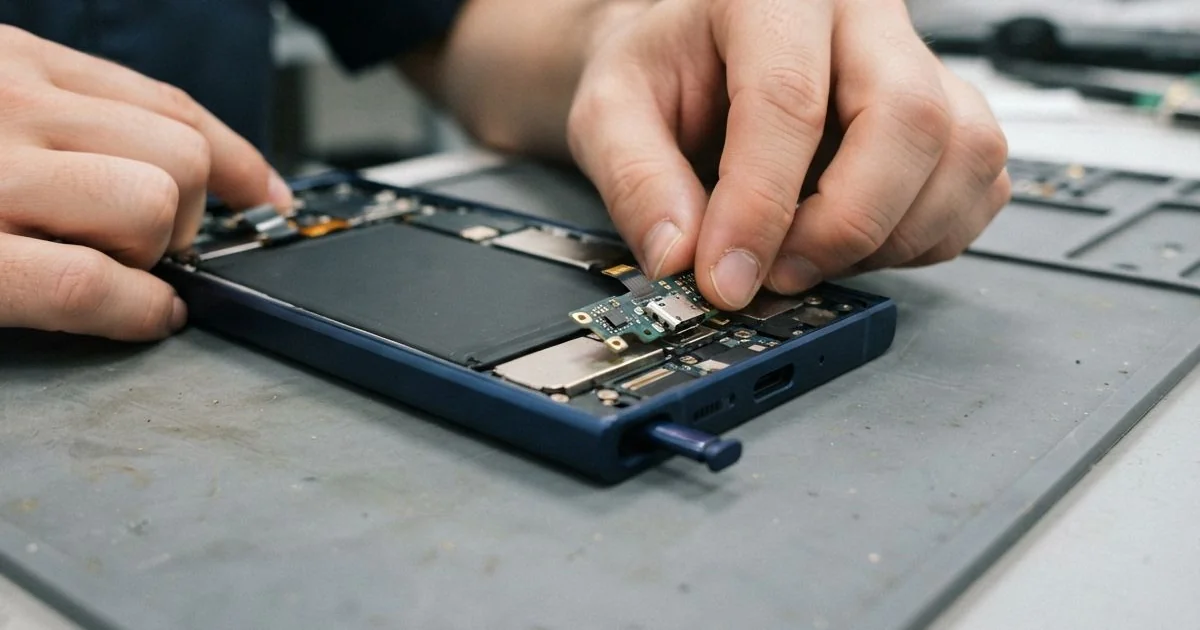
Samsung Galaxy S24 Ultra Charging Port Repair in Al Khobar fixes a phone that won't charge or charges slowly. We check the port free and clean it where we can. If it's worn or broken, we replace the small charging board, then test fast charging.
A Samsung S24 Ultra not charging is easy to notice. The cable feels loose, charging stops when you move the phone, or fast charging never starts. Some phones also show a moisture warning when they are completely dry.
It's better not to wait. A loose plug can spark on dirty pins and slowly burn them. Never charge while the moisture warning shows, because power and wet pins quickly make rust.
Many ports only need a proper clean. Pocket lint and fine sand pack down at the back, so the cable can't go all the way in. We clean it with fine plastic tools, never metal pins that can bend the contacts.
A worn, cracked or rusty Samsung S24 Ultra charging port is different. On this phone the port sits on a small charging board at the bottom, together with the microphone. We replace that board, which fixes the port and gives you a fresh microphone too.
How Kabayan Center Repairs a Samsung Galaxy S24 Ultra Charging Port
We fix these charging faults on this phone.
- A cable that feels loose or slips out
- Charging that starts and stops when you move the phone
- Super fast charging that no longer turns on
- A moisture warning on a phone that is dry
- Bent, burnt or green pins inside the port
- A weak microphone on calls, since it sits on the same small board
Here is how a Samsung Galaxy S24 Ultra charging port repair works with us, step by step.
- We check the phone free, look into the port under a magnifier and measure the charging power.
- We tell you what it needs, and you decide before any work starts.
- If it only needs cleaning, we remove the lint with fine tools and test again.
- For a worn port, we take out the S Pen, lift the back glass and disconnect the battery.
- We remove the loudspeaker, then swap the charging board that holds the port and the microphone.
- We seal the back glass with fresh glue and renew the water seal.
- We test cable charging, super fast charging and a call, then you check the phone yourself.
Own a different phone, or a laptop? Our charging port repair service covers those too. Customers come to our shop on King Fahd Road from Dammam and Dhahran as well.
Why a Galaxy S24 Ultra Stops Charging: 3 Real Cases
Lint packed into the port and the S Pen slot
A hotel receptionist came to us sure the battery was dying. The phone took hours to charge, and the cable wobbled in the port. "It only charges if I hold it at an angle," the receptionist said.
They had asked for a phone battery replacement, but our test showed the battery was healthy. The phone lived in a uniform pocket all day. Pocket lint had packed down hard at the back of the port.
The same lint had filled the S Pen slot, so the pen stuck halfway out. We cleaned both with fine plastic tools, slowly, so the pins stayed straight. It took a few minutes and needed no new parts.
After the clean, the cable clicked in firmly again. Super fast charging came back at once, and the pen slid in and out smoothly. We tested it with the same cable the receptionist used every day.
The receptionist had searched for Samsung Charging Port Repair in Al Khobar, expecting a big job. It turned out to be one of the smallest fixes we do. We suggested checking the pocket for lint now and then.
Green pins from sea air near the Corniche
This one starts in a flat near the Corniche. A chef lived there and kept the window open for the sea breeze. The phone charged every night on a table next to that window.
Salty, damp air settles on metal. Over the months, the pins inside the port turned green. "It says moisture detected, but the phone is dry," the chef told us.
Under the magnifier, we found green crust on several pins and one pin eaten away. Salt had also crept a little way past the port. So we checked the board too, the same way we do in a water damage repair.
The main board was clean, but the charging board was too rusty to save. We fitted a new board, then renewed the water seal around the back glass. The Samsung Galaxy S24 Ultra charging port repair was done the same day.
The moisture warning was gone, and fast charging worked again. We suggested charging away from the open window, where the sea air can't reach the pins. A soft, dry cloth over the port area helps too.
Fell while plugged into a car charger
We often see this with phones used for work in the car. A courier kept the phone on a car charger, with the cable hanging down. One sharp brake, and the phone flew off the holder while still plugged in.
The cable acted like a lever and cracked the port inside. "Now nothing charges it, not even at home," the courier said. That evening they searched for mobile repair in Al Khobar.
We found the port cracked and one side pulled away from the charging board. The car cable was bent at the plug too, so it could damage a new port. We replaced the charging board and told the courier to throw that cable away.
Cable charging worked again, fast and steady. But wireless charging had stopped, because the fall had also hurt a small part on the main board. Fixing that needs a motherboard repair.
The courier chose to leave it for now, since cable charging was enough for work. The phone went home working, with a short new cable and a firmer holder. The wireless fix can still be done later, whenever the courier is ready.
How to Keep Your Galaxy S24 Ultra Charging Port Working
- Check your pocket for lint, and clean the port with a plastic tool, never a metal pin.
- Pull the cable out by the plug, not by the wire.
- Use a short cable in the car, so a sudden stop can't lever the plug.
- Charge away from open windows near the sea, where salty air settles on the pins.
- Never charge while the moisture warning shows. Let the phone dry first.
- Take it for phone repair in Al Khobar as soon as the cable starts to feel loose.
Related services
- Phone screen replacement for a cracked or dark screen after a fall
Questions about this repair
Ask us anything else on WhatsApp
we answer during shop hours.