Samsung Galaxy S24 Ultra Motherboard Repair in Al Khobar
Samsung Galaxy S24 Ultra Motherboard Repair in Al Khobar for a phone that won't start or restarts again and again. We check it free and tell you what it needs. You decide first, and we don't look through your files.
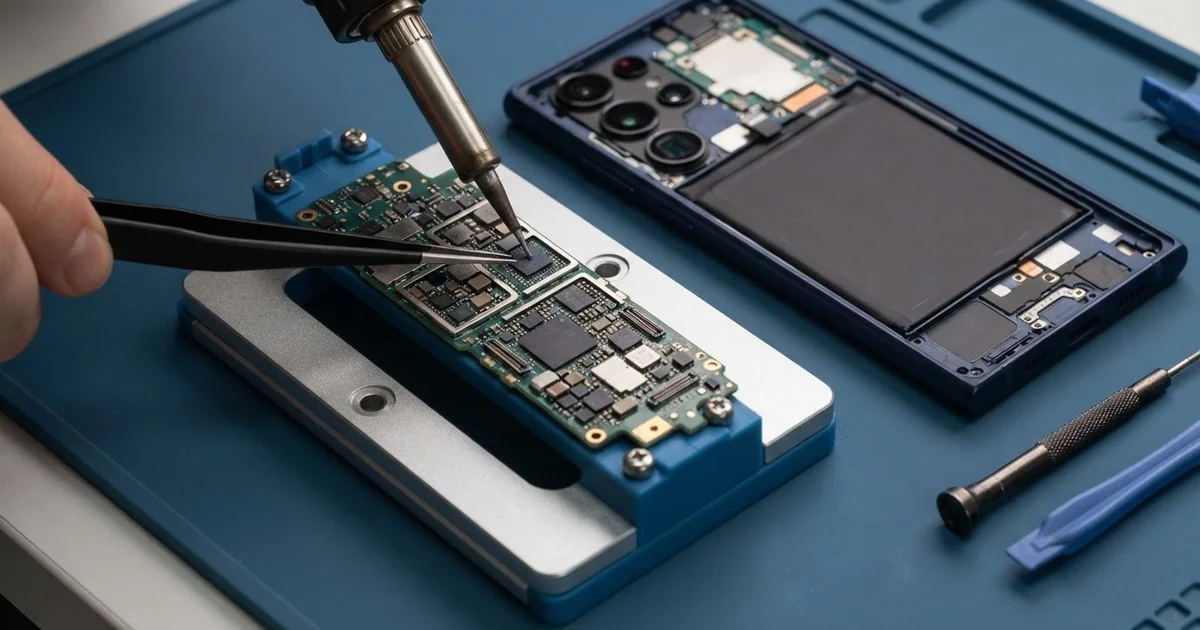
Samsung Galaxy S24 Ultra Motherboard Repair in Al Khobar brings back a phone that is dead, stuck or hot. We check it free and find the short on the board with a meter. Then we fix or replace the failed part and test calls, the S Pen and your data.
A Samsung S24 Ultra not turning on is the sign most people bring in. The screen stays black, the S Pen does nothing, and the charger shows no sign of life. Others get stuck on the logo, or turn hot while switched off.
Waiting can make a board fault worse. A short keeps pulling power and heating the parts around it. If the phone is wet or hot, don't keep charging it, because that is how small faults spread.
Some dead phones don't need board work at all. A failed update can cause a boot loop, and fresh software can fix it. A worn battery or a cracked charging board can also look exactly like a dead board.
A true fault on the Samsung S24 Ultra motherboard is a failed part, often near the power chip. We find it with a meter and a microscope. Then we replace only that part, so the rest of the board stays as it was.
How Kabayan Center Repairs a Samsung Galaxy S24 Ultra Motherboard
These are the board faults we fix on this phone.
- No power at all, with no vibration and no charging sign
- Stuck on the logo, or restarting in a loop
- Heat near the cameras while the phone is doing nothing
- No signal or no Wi-Fi after a drop
- A board with sticky residue or rust from a spilled drink
- Wireless charging or the S Pen not working after a fall
Here is how a Samsung Galaxy S24 Ultra motherboard repair works with us, step by step.
- We check the phone free and rule out the battery, the charging board and the software first.
- We tell you what it needs, and you decide before any work starts.
- We remove the S Pen, lift the back glass and disconnect the battery.
- We lift out the main board and clean it if a drink or water has reached it.
- We power the board from a bench supply, a tool that shows where power leaks, and find the failed part.
- We replace that part under a microscope, then refit the board and renew the water seal.
- We test calls, Wi-Fi, charging, cameras and the S Pen, then you check the phone yourself.
Is it a different phone, or a laptop that won't start? We do motherboard repair on those as well, with the same tools. People drive to our shop on King Fahd Road from Dammam and Dhahran too.
Why a Galaxy S24 Ultra Won't Turn On: 3 Real Cases
A hard drop onto one corner
One morning a phone came in that had looked perfect the day before. A warehouse worker had dropped it from a loading ramp, and it hit the concrete corner first. "No crack, no mark, but it's dead," the worker told us.
The titanium frame had hidden the damage well. The shock from a corner drop travels into the board, and tiny parts can crack under their solder. From outside, the phone looked like new.
The worker had searched for Samsung Motherboard Repair in Al Khobar during the night shift. On our bench supply, the board pulled far too much power at once. Under the microscope, a small part next to the power chip had a hairline crack.
We replaced that part, and the phone started again. The same fall had also loosened the port on the charging board, so charging came and went. With the worker's okay, we added a charging port repair.
Everything worked in the final test, including the S Pen and wireless charging. The worker now uses a case with thick corners, and a zipped pocket on the ramp.
Mango juice spilled at a picnic
This one starts on a picnic blanket in the park. A child knocked a cup of mango juice over the phone. The parent wiped it off, and the phone seemed fine for a while.
Then the speaker began to crackle, and the phone switched off. "It was working, and now it won't start," the parent said. Sugar is worse than water, because it turns sticky and holds moisture against the parts.
The parent found us by searching for mobile repair in Al Khobar. Inside, a sticky film covered the board near the loudspeaker and one camera. We cleaned it in a special bath, the way we start every water damage repair.
A few small parts had rusted through under the sugar, and we replaced them. The phone started, the screen came back, and calls worked again. We also cleaned the charging board, where sticky juice had reached the pins.
But not everything came back. The wide camera stayed a little blurry, and the loudspeaker sounded weaker than before. The parent chose to keep it that way for now, since calls and the main camera were fine.
A boot loop after an update was cut off
We often see this: a phone stuck on the logo, but the board is fine. A pharmacist started a software update late at night, with the battery nearly empty. The phone ran flat and switched off halfway through.
"It shows the logo, then restarts, again and again," the pharmacist said. They feared the board had failed and all their work notes were lost. Shift plans and stock lists were all on that phone.
We tested the board first, and it pulled normal power with no short. The fault was the half-finished update, not the hardware. So no board work was needed at all, and no part had to be replaced.
We loaded the phone's software again, using a method that keeps your files in place where it can. The phone started normally, with every note, photo and chat still there. It took a while, since the whole system had to be copied back in.
Had the files been lost, we would have moved on to data recovery. Luckily, it wasn't needed. Now the pharmacist updates only on the charger, with a backup made first.
How to Keep Your Galaxy S24 Ultra Board Safe
- Keep the phone on charge during a software update, and never switch it off halfway.
- Wipe up a spilled drink at once, then switch the phone off and bring it in. Sugar does its damage slowly.
- Use a case with thick corners, since corner drops send the shock into the board.
- Stop charging a phone that is wet or hot.
- Back up your photos, notes and chats often, so a board fault never costs you your files.
- Bring it for phone repair in Al Khobar at the first restart loop or strange heat.
Related services
- Phone battery replacement for a phone that dies early or swells
Questions about this repair
Ask us anything else on WhatsApp
we answer during shop hours.