Samsung Galaxy S25+ Charging Port Repair in Al Khobar
Samsung Galaxy S25+ Charging Port Repair in Al Khobar for a cable that wobbles or falls out. It also helps when the phone charges only at an angle. We look inside the port free and tell you what we see. You decide before any work starts, and your phone data stays exactly as it is.
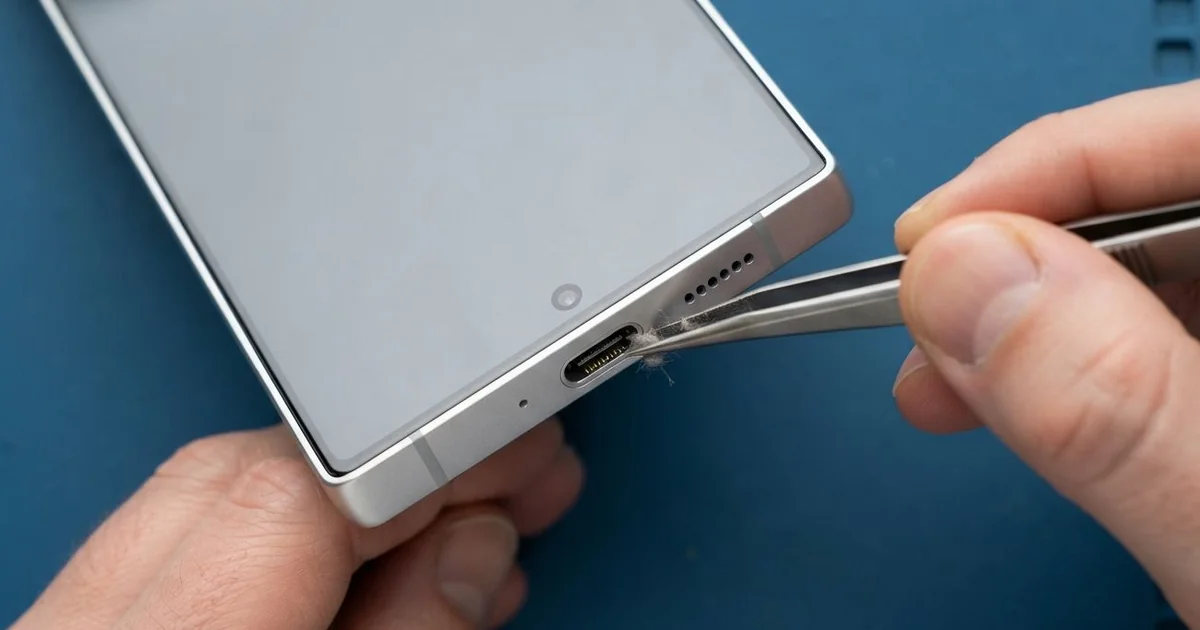
Samsung Galaxy S25+ Charging Port Repair in Al Khobar fixes a phone that charges slowly, loosely or not at all. We check the port free and clean it when dirt is the only problem. Worn or burnt pins get a new USB-C port board, and most jobs are done the same day.
Many owners first say it like this: my Samsung S25 Plus not charging unless the cable is held just right. Some see a moisture warning that won't go away. Others hear the charging sound again and again as the connection drops.
A bad port gets worse if you keep forcing it. Loose pins spark a little each time, and that heat burns them further. A burnt port can even pass damage on to the main board.
Often the fix is simple. Lint, sand and dust pack into the back of the port and stop the plug from going in fully. A careful cleaning with the right tools brings charging back without any new part.
Bent, burnt or rusty pins are different. The Samsung S25 Plus charging port sits on a small board joined to the main board by a flex cable. We replace that small board, so the main board and your data are never touched.
How Kabayan Center Repairs a Samsung Galaxy S25+ Charging Port
These are the charging faults we see on this phone.
- The cable feels loose and drops out with a small tug
- Charging only works when the plug is held at an angle
- A moisture warning that stays on even when the phone is dry
- Very slow charging, or fast charging that no longer switches on
- Dark or green marks on the pins inside the port
- The computer no longer sees the phone through the cable
This is how the repair goes on the bench.
- We try our own cable and charger, then look inside the port under a magnifier.
- We tell you what we found, and you decide before any work starts.
- If dirt is the cause, we clear it with a plastic pick and cleaning alcohol, never metal.
- For a new port, we lift the back glass, remove the lower cover and unplug the battery.
- We unclip the flex cable, unscrew the old port board and fit the new one.
- We test charging speed, data through the cable, and calls, since the bottom microphone sits nearby.
- We seal the back glass with fresh glue, and you test the phone with your own charger.
Other phones get the same care through our charging port repair service. Our shop is on King Fahd Road, and plenty of customers come over from Dammam and Dhahran.
How a Galaxy S25+ Charging Port Fails: 3 Real Cases
Oil-field sand packed into the port
Work in the oil fields is hard on phones. A field worker kept this phone in an overall pocket through long shifts in the desert. Fine sand and dust blew into every opening.
"It only charges if I bend the cable down," the worker told us. The plug would no longer click in fully. Each night the phone gained only a little charge.
Under the magnifier we saw a hard layer of sand packed at the back of the port. Each time the plug went in, it pressed the sand tighter. The pins were dusty but not burnt.
We picked the sand out slowly with a plastic tool and cleaned the pins. No new part was needed. The cable clicked in fully and stayed firm.
The worker also said the phone died by lunch on site. Our test showed the battery was worn out from the heat in the site cabin. We did a phone battery replacement the same visit, so the phone lasted the whole shift again.
A small rubber dust plug keeps sand out of the port on site. The worker now uses one and blows the port clear with a small air bulb.
A wet towel in a gym locker
One morning a phone came in still wrapped in a gym towel. Its owner kept it in the locker with a wet towel and sweaty clothes after every workout. A moisture warning showed up often, and the owner kept ignoring it.
One day the owner forced a fast charge while the port was still damp. Soon after, the phone stopped charging completely. The owner had searched for Samsung Charging Port Repair in Al Khobar on the walk home.
Inside the port we found green crust on the pins and one pin burnt black. Sweat is salty, and salt water eats metal very quickly. Charging a wet port makes it spark and burn.
We fitted a new port board. We also found a spot of rust near the board connector and cleaned it during a water damage repair. Charging worked well again, and the moisture warning finally disappeared.
The bottom microphone did not recover fully, though. Callers said the voice sounded faint, so the owner now uses earphones for calls. We offered a new microphone later, once the owner is ready.
Pulled sideways when it fell from a bike mount
This one starts on a bumpy road. A rider charged the phone on a handlebar mount while following maps. A hard bump threw the phone off the mount, but the cable stayed plugged in.
The phone swung on the cable and hit the road. The plug bent the port sideways inside the phone. After that, charging only worked if the rider held the cable perfectly still with one hand.
The rider looked up mobile repair in Al Khobar from the side of the road. We found the port shell bent and two pins pushed out of line. We replaced the port board, and the cable fitted firmly and straight again.
The fall had also cracked the screen at one corner, and touch was patchy there. We did a phone screen replacement in the same visit. The phone charged and worked normally when the rider picked it up.
The rider now uses a mount with a locking strap. A short cable also helps, because it can't swing so far. The rider also charges the phone fully before a long ride now.
How to Keep Your Galaxy S25+ Charging Port Healthy
- Pull the plug out straight by its head, never by the cable.
- Keep the port dry, and wait for the moisture warning to clear before you charge.
- Use a rubber dust plug if you work in sand or dust.
- Clean lint out with a plastic pick, never a pin or a needle.
- Lock the phone on a bike mount with a strap, and use a short cable.
- Book a phone repair in Al Khobar at the first loose feeling, before the pins burn.
Related services
- Motherboard repair if the phone still won't charge with a new port
Questions about this repair
Ask us anything else on WhatsApp
we answer during shop hours.