Samsung Galaxy S25+ LCD Display Replacement in Al Khobar
Samsung Galaxy S25+ LCD Display Replacement in Al Khobar for a smashed or blacked-out screen. It also fixes lines and touch that stops working. We look at the phone free and tell you what it needs. Nothing starts until you agree, and your photos and chats stay on the phone.
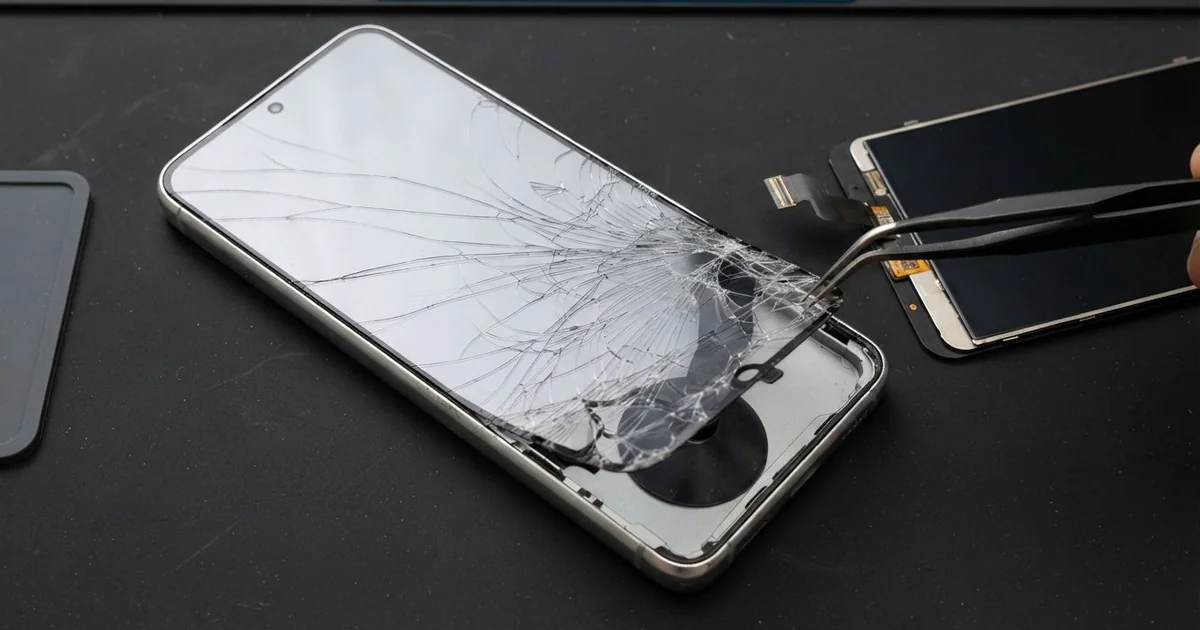
Samsung Galaxy S25+ LCD Display Replacement in Al Khobar fixes a cracked, dark or flickering screen on this phone. We check it free, then fit a complete new screen, with the glass and display joined as one part. We test touch, colour and the fingerprint reader, and most jobs are done the same day.
A Samsung S25 Plus broken screen can show up in different ways. Some owners see a spider-web crack after a fall. Others see green lines, a black patch that grows, or a screen that stays dark while calls still ring.
Waiting usually makes things worse. Small chips of glass can cut a finger, and cracks let dust and moisture inside. The fingerprint reader sits under the screen, so a dead display can also lock you out of your own phone.
Not every fault needs a new part. A loose screen connector after a knock can blank the display, and we fix that by cleaning and refitting it. A thick or lifted screen protector can also cause ghost taps, and removing it is enough.
Real cracks, black ink and dead touch are different. On this phone the glass and the display are one glued part, so they cannot be split. A Samsung S25 Plus screen replacement means fitting that whole part new, and it clears all of these faults together.
How Kabayan Center Replaces a Samsung Galaxy S25+ LCD Display
These are the screen faults we fix on this model.
- Cracked front glass, from a small corner chip to a full spider web
- Black or purple ink that spreads a little more each day
- Green, pink or white lines running down the display
- Touch that misses taps, or ghost taps that open apps alone
- A fingerprint reader that no longer reads through the glass
- A screen that stays dark while the phone still rings and vibrates
This is how we fit the new screen, one step at a time:
- We check the phone free and test cameras, speakers, charging and buttons first.
- We explain what it needs, and you decide before any work starts.
- We warm the back glass, lift it, and unplug the battery before touching the screen.
- We soften the old screen glue with gentle heat and ease the broken screen out.
- We clean every bit of old glue and glass from the frame, so the new part sits flat.
- We connect the new screen, test touch and colour, then seal it with fresh glue.
- We help you set up your fingerprint again, and you check the phone before you leave.
Own a different model? Our phone screen replacement covers other phones in the same careful way. The shop is on King Fahd Road, and many customers drive in from Dammam and Dhahran.
How a Galaxy S25+ Screen Breaks: 3 Real Cases
Dropped flat on the kitchen tiles by a child
This one starts at home in the kitchen. A parent gave the phone to a small child to watch cartoons. The child walked off with it and dropped it flat on the tiles.
"The picture is still there, but my finger does nothing," the parent told us. Cracks ran from one corner across the whole glass. Touch only worked along the top edge.
Tiles are hard and don't give at all. When a phone lands flat, the force spreads right across the glass. The thin touch layer under it cracks along with the glass.
The parent had searched for Samsung Screen Replacement in Al Khobar that same evening. We fitted a new screen and set up the fingerprint again. Touch worked from edge to edge.
During our final test, photos looked soft with a bright ring. The small glass over the rear cameras had cracked in the same fall. So we also did a phone camera repair, and the photos came out sharp again.
The phone went home fully working, now in a case with a raised lip. The child still watches cartoons, but on a stand on the table.
Slid off an airport security tray
A common case with business travellers: the rush at airport security. One traveller grabbed a laptop tray in a hurry. The phone slid off the edge and hit the hard floor on one corner.
At first there was only a small chip at the corner. During the flight, a black patch began to spread from that chip. By landing, half the screen was dark and touch was dead on that side.
A hard corner hit can break the display layer inside while the glass holds. The black ink is the display leaking inside, and it keeps spreading. We confirmed the connector was fine, so the display itself had failed.
The traveller also said the phone died before dinner on every work trip. Our battery test showed it was weak from constant use. We did a phone battery replacement while the phone was already open, which saved a second opening later.
The phone left with a clear screen and a full day of charge. Keep the phone in a zipped bag pocket at security, never loose on a tray. The traveller now does exactly that.
Knocked off a sunbed onto wet pool tiles
We often see this one in the hot months. A phone sat on a sunbed beside a hotel pool. A towel pulled it off, and it landed on the wet tiles.
A crack ran along the lower edge of the glass. The owner kept using it with wet hands for the rest of the day. The next morning, the bottom speaker sounded muffled and a moisture warning appeared on charging.
The owner looked up mobile repair in Al Khobar from the hotel room and came straight to us. Water had crept in through the crack. We found white marks and a little rust near the bottom speaker and the charging port.
We cleaned and dried the board as part of our water damage repair, then fitted a new screen. The moisture warning stopped, and touch worked well again. Charging by cable was normal too.
The speaker did not fully recover, though. Calls on loudspeaker stayed a little quieter, and the owner chose to wait on a new speaker. Next time, a cracked phone stays in a dry bag by the pool.
How to Keep Your Galaxy S25+ Screen Safe
- Use a case with a raised lip, so the glass never lands flat on hard floors.
- Put the phone in a zipped pocket at the airport, not loose in a security tray.
- Keep a cracked phone away from pools, sinks and wet hands until it is repaired. A cracked screen is no longer sealed.
- Choose a thin film protector that works with the in-screen fingerprint reader.
- Back up your photos while the screen still works, so a dark display never costs you your files.
- Book a phone repair in Al Khobar at the first black spot, because the ink keeps spreading.
Related services
- Charging port repair for a phone that charges loosely after the same fall
Questions about this repair
Ask us anything else on WhatsApp
we answer during shop hours.