Samsung Galaxy S25+ Motherboard Repair in Al Khobar
Samsung Galaxy S25+ Motherboard Repair in Al Khobar for a phone that stays black or keeps restarting. We test it free and tell you what failed. If we can't fix it, you pay nothing, and we never look through your files.
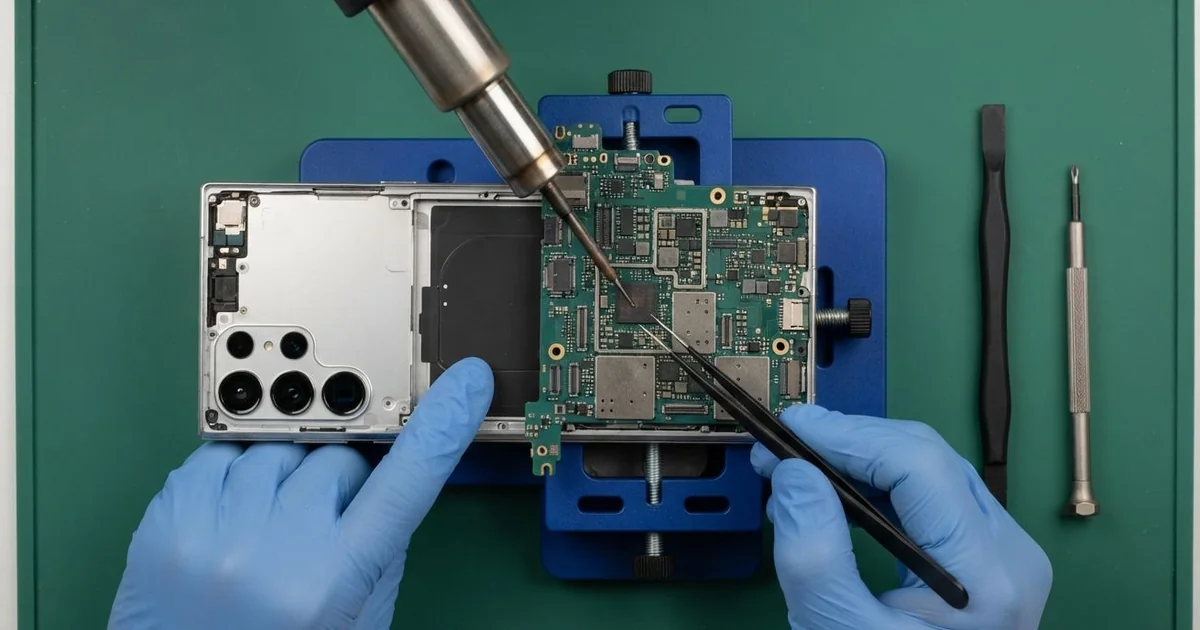
Samsung Galaxy S25+ Motherboard Repair in Al Khobar brings back a dead or restarting phone. We test the board free, even if it is frozen on the logo, and find the exact faulty part. Then we repair or replace that small part and keep your data safe, often the same day.
Most owners describe it simply: a Samsung S25 Plus not turning on, even on the charger. Some phones show the logo and then go black again. Others turn on but lose signal, get hot, or restart during calls.
Acting fast matters with board faults. Pressing the power button again and again can push more current through a short. If water is the cause, rust keeps spreading across the board every day it waits.
Not every dead phone has a broken board. A failed update, a flat battery or a loose connector can look exactly the same. We rule those out first, and sometimes a software reload is all it needs.
The Samsung S25 Plus motherboard is small and packed with tiny chips. When one of them fails, we find it under a microscope and replace only that part. The rest of the board, and your photos, stay as they are.
How Kabayan Center Repairs a Samsung Galaxy S25+ Motherboard
These are the board faults we find most on this phone.
- No power at all, with no vibration and no charging sign
- Stuck on the logo, or starting and restarting in a loop
- Random restarts during calls, video or maps
- No signal or no Wi-Fi after a drop or a knock
- No charging, even with a good cable and a new port
- A phone that gets warm while it is switched off
This is how we work on the board, step by step:
- We connect the phone to a bench power supply and read how much current it draws.
- We tell you what we found, and you decide before any work starts.
- We open the back, unplug the battery and lift the main board out of the frame.
- We check the board under a microscope for rust, cracks and burnt parts.
- We use a heat camera to find a short, since the faulty part warms up first.
- We replace or re-solder that part, which means melting its tiny joints and fixing them again.
- We refit the board and test charging, signal, sound and cameras before you collect it.
Have a different phone or a laptop? Our motherboard repair covers other devices too. Our bench is on King Fahd Road, and we get board jobs from Dammam and Dhahran as well.
How a Galaxy S25+ Board Fails: 3 Real Cases
An update cut off by a flat battery
This case started with a software update late at night. A shop cashier tapped install with very little charge left and went to sleep. The battery ran out halfway through.
In the morning the phone showed the logo, then went black. After that it did nothing at all. The cashier had searched for Samsung Motherboard Repair in Al Khobar, sure the board was dead.
Our current test told a different story. The board woke up normally and drew power in the right way. The problem was broken system software, not a broken part.
We reloaded the system software through a cable, in a way that keeps your files. The phone started up with all the chats and photos still there. "I thought everything was gone," the cashier said.
Our battery test then showed why it had died so fast. The battery was badly worn and dropped charge in sudden steps. We did a phone battery replacement, so the next update won't get cut off.
Always charge the phone well before you start an update. The cashier now updates only with the charger plugged in.
Dropped into a sink of soapy water at a hotel
A hotel housekeeper brought this one in a plastic bag. The phone slipped from an apron pocket into a laundry sink full of soapy water. It sat under the water for a moment before anyone noticed it was gone.
A coworker said to put it in rice. The housekeeper also pressed the power button many times and plugged in the charger to test it. By the next morning the phone would not show any sign of life.
The housekeeper found us by searching for mobile repair in Al Khobar. Inside we found green rust around the power chip and one small part burnt through. Charging a wet phone sends current straight across the water, and soap makes it spread further.
We cleaned the whole board as part of our water damage repair. The main power area was too far gone to bring back. The phone itself could not be saved, and we said so honestly.
The storage chip was still healthy, though. With data recovery, we copied the photos and contacts onto a new phone. The housekeeper lost the old phone but kept every family picture.
Fell down the steel stairs on an offshore rig
Offshore work gives us some of the hardest cases. A rig worker's phone slipped from a chest pocket on the steel stairs. It bounced down the steps and landed hard on the metal deck below.
The screen did not even crack in the fall. But the phone was dead, and charging showed nothing. "It looks perfect, it just won't wake up," the worker told us.
A hard hit on steel can crack the tiny solder joints under a chip. The chip looks fine from above, but it loses contact with the board underneath. Our heat camera and current test pointed to the power chip.
We removed the chip, cleaned its pads and fitted it back with fresh solder. The phone switched on, but it showed no signal at first. The small antenna cable had also jumped off its socket in the fall.
We clicked the cable back in and tested calls and data. Everything worked normally after that, and the photos from the rig were all still there. The worker now clips the phone to a short strap while on the stairs.
How to Keep Your Galaxy S25+ Board Safe
- Switch a wet phone off at once, and never charge it until it is checked.
- Skip the rice, because it does not stop rust on the board.
- Charge the phone well before you install a software update.
- Clip the phone to a strap when you work at height or on stairs.
- Back up your photos often, so a dead board never costs you your memories.
- Book a phone repair in Al Khobar if the phone feels warm while it is switched off.
Related services
- Charging port repair if the phone won't charge but the board tests fine
Questions about this repair
Ask us anything else on WhatsApp
we answer during shop hours.