Samsung Galaxy S25 Ultra Charging Port Repair in Al Khobar
Samsung Galaxy S25 Ultra Charging Port Repair in Al Khobar for a loose, dirty or dead port. It helps when the cable wobbles or the phone charges very slowly. We check the port free and explain the fault. You decide before we start, and we never touch your files.
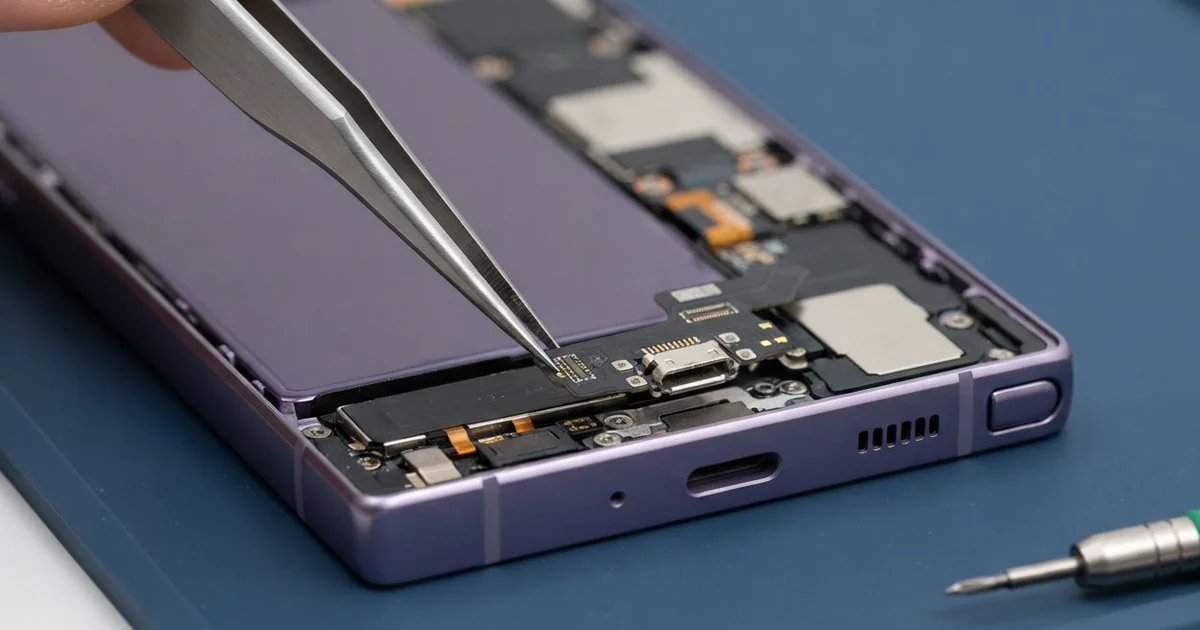
Samsung Galaxy S25 Ultra Charging Port Repair in Al Khobar gets a slow or dead port charging again. We check the port free and give it a deep clean when dirt is the cause. Worn or burnt pins get a new port board, and most jobs are done the same day.
People often say it the same way: my Samsung S25 Ultra not charging unless I hold the cable. Some phones charge only when lying flat on a table. Others show a moisture warning for no reason, or charge so slowly they never reach full.
A loose port rarely fixes itself. Every time the plug wobbles, the pins spark a little and wear further. In the end, a burnt port can send damage deeper into the phone.
Many ports only need a proper clean. Lint and dust pack into the back of the port, so the plug can't reach the pins. We pick it out gently, and charging often comes back with no new part.
Bent, worn or burnt pins need a new part. The Samsung S25 Ultra charging port sits on a small board, joined to the main board by a flex cable. We change that small board only, so the main board and your data stay as they are.
How Kabayan Center Repairs a Samsung Galaxy S25 Ultra Charging Port
These are the port faults we see most on this model.
- A cable that wobbles and loses the connection when you move
- Charging that works only with the phone lying flat
- Charging far slower than it used to be
- A moisture warning that appears even when the port is dry
- A plug that won't push all the way in
- Dark, bent or rusty pins you can see with a torch
This is how we handle the port, step by step.
- We test with our own cable and a meter that shows how much power reaches the phone.
- We explain what we found, and you decide before any work starts.
- We look inside with a magnifier and bright light, and clear any dirt with a plastic pick.
- For a new port, we take out the S Pen, lift the back glass and unplug the battery.
- We remove the lower cover, unclip the flex cable and unscrew the old port board.
- We fit the new board and check that the plug clicks in firmly with no wobble.
- We test charging, data and call sound, reseal the back, and you try your own charger.
Other phones can have the same fault, and our charging port repair covers them too. Our shop is on King Fahd Road, and customers from Dammam and Dhahran bring phones in often.
How a Galaxy S25 Ultra Charging Port Wears Out: 3 Real Cases
Charged all night from a power bank in a jacket pocket
Night work is tough on a charging port. A security guard walked patrol rounds all night with the phone in a jacket pocket. A power bank sat in the same pocket, and the cable stayed plugged in.
The cable bent sharply at the plug with every step. "It charges on the table, but not in my pocket," the guard told us. Then it stopped charging in the pocket completely.
The guard had searched for Samsung Charging Port Repair in Al Khobar during a quiet shift. Under the magnifier, the port shell had worn loose. The pins inside had spread apart from all that sideways pressure.
Cleaning would not fix worn metal, so we replaced the port board. The new plug clicked in tight and did not move when we tugged it gently. Charging held steady even with the cable bent.
We also showed the guard a better way to charge on patrol. An angled cable puts far less strain on the port. The guard now charges fully before the shift and keeps the power bank for emergencies only.
The phone went back to night duty with a firm, steady connection. It charged normally again, in the pocket and on the table.
A poor-quality car charger on the daily highway drive
A ride-hailing driver came in with a phone that had simply stopped charging. It had been plugged into a no-name car charger during a hot afternoon of fares. The phone got very hot on the holder, and then charging stopped for good.
The driver expected a simple port swap. But the port looked clean, and every pin was straight. Our meter showed no power reaching the phone at all, by cable or wireless.
That told us the fault was deeper than the port. A power surge from the charger had burnt a small charging chip on the main board. So the job became a motherboard repair instead of a new port.
We replaced the burnt chip, and the phone charged normally again. While it was open, we noticed the battery had swollen slightly from the same heat. It was not dangerous yet, but it would get worse.
The driver needed the phone back for work that evening and chose to wait on the battery. We advised a phone battery replacement soon, before the swelling lifts the back. So the phone left charging again, but with one job still to do.
Uniform lint and a broken toothpick
Hotel staff bring us this one quite often. A front desk worker kept the phone in a uniform trouser pocket through every long shift. Tiny fibres from the pocket slowly packed into the port.
One night the phone would not charge at all. The worker tried to clean the port with a toothpick, and the tip snapped off inside. "Now the cable won't even go in," the worker said.
The worker looked up mobile repair in Al Khobar and came in before the next shift. Under the magnifier we saw a wooden splinter wedged across the pins. Behind it sat a hard pad of grey lint.
We lifted the splinter out in one piece and picked the lint away slowly. Metal tools can scratch the pins, so we used only soft plastic ones. Luckily, the pins were clean and straight underneath.
No new part was needed, just a careful clean. The cable clicked in fully, and the phone charged at its normal speed. The worker now keeps the phone in a shirt pocket with a flap, where less lint builds up.
How to Keep Your Galaxy S25 Ultra Charging Port Healthy
- Charge fully before a shift, instead of charging in your pocket all day.
- Use an angled cable if you must charge while moving.
- Clean lint out with a plastic pick, never a toothpick, pin or needle.
- Choose a good car charger with proper safety marks, and replace one that gets hot.
- Wait for the moisture warning to clear before you plug in.
- Book a phone repair in Al Khobar at the first wobble, before the pins burn.
Related services
- Water damage repair if the port got wet and shows green marks
- Phone screen replacement if the same phone has a cracked screen
Questions about this repair
Ask us anything else on WhatsApp
we answer during shop hours.