Samsung Galaxy S25 Ultra Motherboard Repair in Al Khobar
Samsung Galaxy S25 Ultra Motherboard Repair in Al Khobar for a phone that won't wake up. It also covers restarts, lost signal and a phone that heats up by itself. We test it free and explain what failed. If we cannot fix it, you pay nothing.
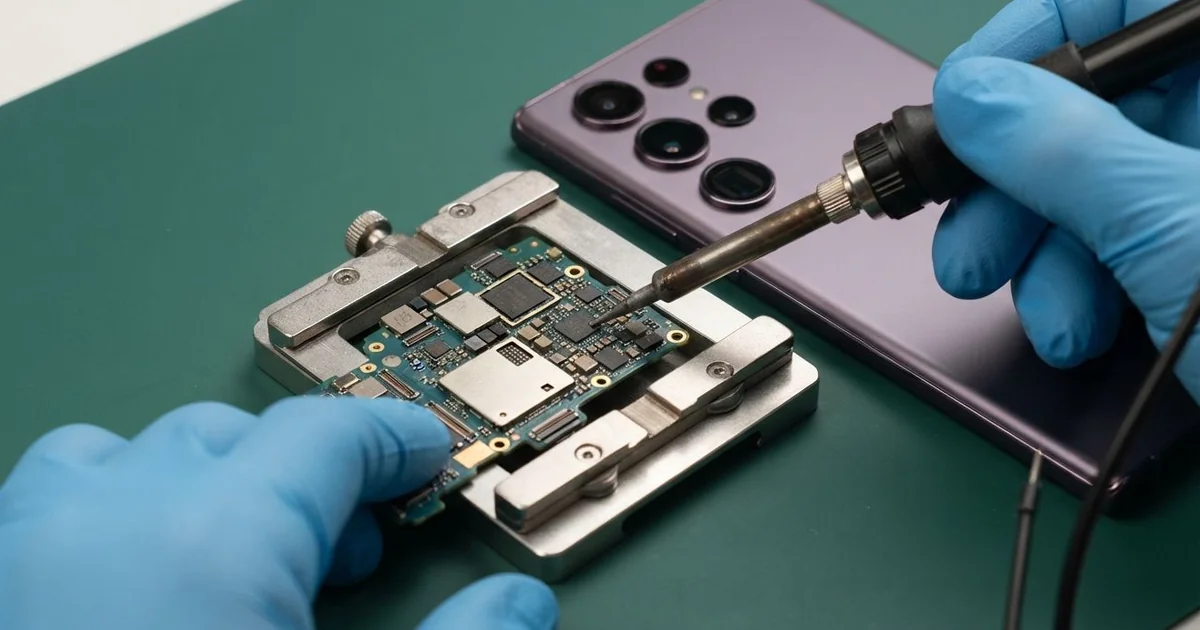
Samsung Galaxy S25 Ultra Motherboard Repair in Al Khobar revives a dead, looping or overheating phone. We test the board free and trace the fault to the exact part that failed. Then we fix that part under a microscope and keep your data safe, often the same day.
Owners usually come in with a Samsung S25 Ultra not turning on at all. There is no vibration, no logo and no charging sign. Other phones do start, but restart in a loop, lose signal, or get hot in a drawer.
Board faults often grow if you leave them. A short can heat up nearby parts each time you try the power button. Liquid under a chip keeps eating the metal long after the phone looks dry.
A dead phone does not always mean a dead board. A drained battery, a loose connector or broken software can all look the same. We check those first, because the fix is then much smaller.
The Samsung S25 Ultra motherboard carries many tiny chips on a very small board. When one fails, we find it with a power test and a heat camera. We replace only that part, so the rest of the board and your files are untouched.
How Kabayan Center Repairs a Samsung Galaxy S25 Ultra Motherboard
These are the board faults we see on this phone.
- A completely dead phone that shows nothing on the charger
- A phone stuck on the logo, or restarting over and over
- Lost signal or no network after a knock or a spill
- A phone that gets hot while switched off or idle
- No charging at all, by cable or wireless, with a good port
- Sudden shutdowns that a new battery did not fix
Here is how the board repair works.
- We power the phone from a bench supply and watch how much current it pulls.
- We explain what we found, and you decide before any work starts.
- We take out the S Pen, open the back, unplug the battery and lift out the board.
- We look over every part under a microscope for rust, cracks or burn marks.
- We find a short with a heat camera, since the faulty part warms up first.
- We remove the bad part with hot air and solder a new one in its place.
- We rebuild the phone and test power, charging, signal, sound and cameras.
For other phones and laptops, our motherboard repair works the same way. Our bench is on King Fahd Road, and board jobs reach us from Dammam and Dhahran as well.
Why a Galaxy S25 Ultra Board Stops Working: 3 Real Cases
Crushed under a toolbox in a work truck
Heavy tools and phones don't mix well. A maintenance technician left the phone on the seat of a work truck. At a sudden stop, a steel toolbox slid off the seat and landed on it.
The thick case saved the screen from cracking. But the phone never turned on again after that. "No light, no buzz, nothing," the technician told us.
Our current test showed the board was drawing no power at all. Under the microscope we found the battery connector lifted from the board. A tiny part beside it had also snapped clean off.
The weight of the toolbox had flexed the board for a moment. That was enough to break the smallest parts near the edge. The main chips were all fine.
We soldered a new tiny part in place and pressed the connector back down firmly. Then we tested the board with our bench supply before rebuilding the phone. It powered up normally and passed every test.
The phone went home with all its photos and settings in place. The technician now keeps the phone in a door pocket, far from the tools. A small change like that saves a lot of trouble.
Baked on a dashboard mount in a mall car park
This case began in a shopping mall car park. A shopper left the phone on a dashboard mount in full sun. The car was parked in the open, with no shade, while the shopper was inside for a long time.
Back in the car, the phone was too hot to hold and had switched itself off. After it cooled, it never came back on. The shopper had searched for Samsung Motherboard Repair in Al Khobar that same day.
Our heat camera found a short on one power line. A tiny part on that line had failed from the heat, and it was pulling power down. We replaced it with a new one, and the phone started up normally again.
But the board was not the only damage. The same heat had made the battery swell a little. A swollen battery can catch fire, so never keep charging it.
We did a phone battery replacement in the same visit and resealed the back. The phone lasted a full day again and stayed cool. The shopper now puts the phone in a shaded bag before leaving the car.
Sweet tea spilled in a security hut
A security guard on night shift brought this one in a sticky case. Sweet tea had tipped over the phone on the desk in the gate hut. The guard wiped the outside dry and kept using it through the night.
The phone worked for a while, then began restarting on its own. Soon it would only come on for a moment before going dark. The guard looked up mobile repair in Al Khobar at the end of the shift.
Sugar makes a spill much worse than plain water. It leaves a sticky layer that holds moisture and eats the metal under the chips. We found brown crust around the power area.
The phone still woke up for short moments, so we worked fast. Using data recovery, we copied the photos and chats off first. Then we cleaned the whole board as part of our water damage repair.
The phone now turns on and stays on. The signal stayed weaker than normal, though, because the tea had reached the antenna area. The guard chose to use it that way, happy to have the photos safe.
How to Keep Your Galaxy S25 Ultra Board Safe
- Keep drinks away from the phone, and switch it off at once after a spill.
- Take the phone with you instead of leaving it on a dashboard in the sun.
- Keep phones away from loose tools and heavy bags in the car.
- Stop pressing the power button on a dead phone, and bring it in instead.
- Back up your photos often, so a board fault never costs you your memories.
- Book a phone repair in Al Khobar if the phone gets hot while it is idle.
Related services
- Charging port repair if the board tests fine but the phone won't charge
Questions about this repair
Ask us anything else on WhatsApp
we answer during shop hours.