Samsung Galaxy S26 Charging Port Repair in Al Khobar
Samsung Galaxy S26 Charging Port Repair in Al Khobar for a cable that needs holding. It also fixes a loose port, or a phone that ignores the charger. The check is free, and we explain what we see. You decide on the repair before we begin.
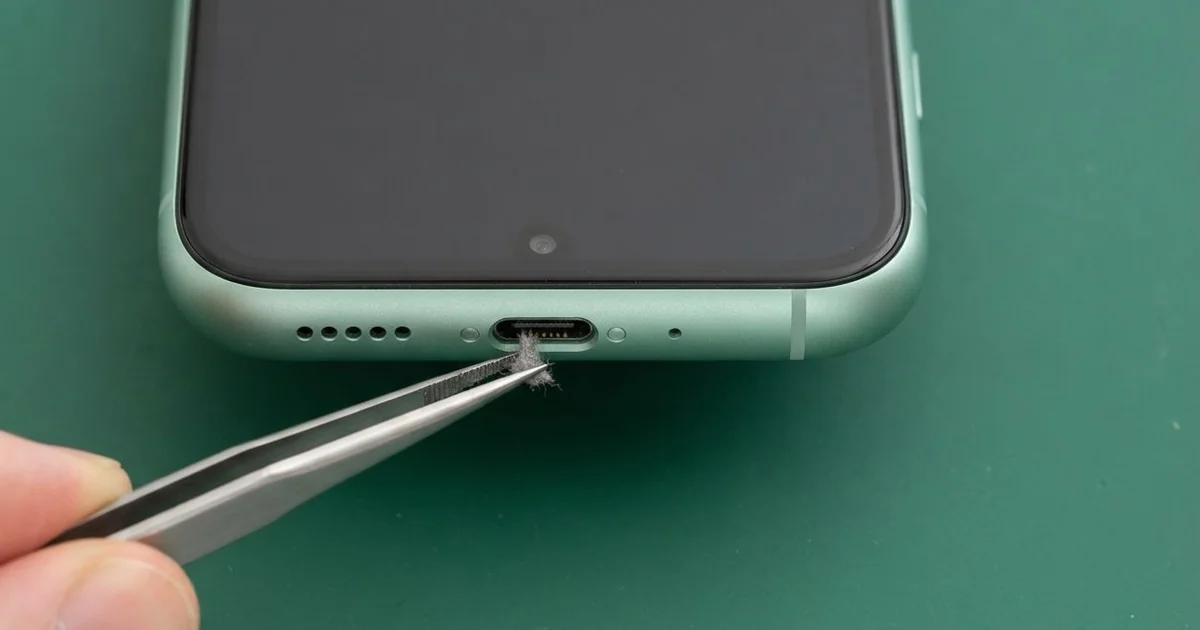
Samsung Galaxy S26 Charging Port Repair in Al Khobar sorts out a phone that charges slowly or not at all. We check the port free, then clear dirt or fit a new port board. After we test every way it charges, most jobs are done the same day.
A Samsung S26 not charging often starts small. The plug sits loosely in the port, or charging stops when you shift your grip. Other times a moisture alert appears and won't clear.
Leaving it is risky, even if it still charges sometimes. A loose plug makes small sparks that blacken the pins over time. A dead battery can also leave your photos and messages stuck on a phone you can't start.
Plenty of ports only need a careful clean. Lint, dust and sand collect at the bottom and stop the plug going all the way in. We clear it with non-metal picks, so the pins stay unmarked.
If the pins are bent, burnt or rusted, the Samsung S26 charging port needs replacing. It sits on a small board at the base, linked to the main board by a flex cable. We change only that small board, and the rest of the phone stays as it is.
How Kabayan Center Repairs a Samsung Galaxy S26 Charging Port
We fix these charging faults on the Galaxy S26.
- A cable that works only at one angle
- A port so loose that the plug drops out
- A moisture alert on a phone that is already dry
- Slow charging, or fast charging that never kicks in
- Green, black or bent pins inside the port
- Charging that works on a wireless pad but not by cable
This is our repair, step by step:
- We inspect the port under a magnifier and test it with a cable we know is good.
- We tell you the cause, and you decide before any work starts.
- For dirt or lint, we clean the port with fine non-metal picks and cleaning liquid.
- For damaged pins, we open the back glass and unplug the battery.
- We fit a new port board and check the flex cable that links it to the main board.
- We close the phone with fresh glue and test cable, fast and wireless charging.
Charging trouble on a different phone? Our charging port repair handles many other devices. Find us on King Fahd Road, where customers from Dammam and Dhahran also come.
Why a Galaxy S26 Port Stops Charging: 3 Real Cases
Soaked on the walk home through a rainstorm
A customer came to us after a sudden rainstorm flooded the streets near home. They walked through it with the phone in a jacket pocket that filled with water. By the next morning, the phone would not charge.
Rainwater on city streets carries dirt and salts. It filled the port and stayed there, drying slowly inside the wet jacket. The customer tried charging anyway, and power on a wet port speeds up rust.
"It charged for a moment, then stopped," they said. That short burst of charging was enough to start rust on the pins.
They had searched for Samsung Charging Port Repair in Al Khobar and came in before work. Under the magnifier, we saw green crust on several pins. A trace of dirty water had also reached the edge of the main board.
We fitted a new port board and cleaned the board edge in our cleaning bath. That extra step was a water damage repair, since rust spreads if it's left. Charging came back strong, and the moisture alert cleared.
Never charge a phone that has just been soaked. Switch it off and bring it in, even if it seems fine.
Gaming while charging with the plug bent sideways
We often see this with mobile gamers. One player held the phone sideways for hours while it charged, with the cable bent hard against a palm. Slowly the plug started to wobble and drop out.
"It drops out right in the middle of a match," the gamer said. They had started wedging the cable in with folded paper.
Every bend pulls the plug against the inside edge of the port. Over time, that loosened the port on its small board. The heat of gaming and charging together also weakened the solder, the metal that holds parts in place.
We found the port rocking inside the frame, with one pin pushed out of line. We fitted a new port board and tested fast charging while a heavy game ran. The folded paper had left fibres inside the port too.
The battery was the next problem. It tested worn from constant charging in heat. The gamer added a phone battery replacement, and the phone lasted much longer.
We suggested an angled cable, which bends away from the hand. Taking breaks from charging during long games also helps the port and the battery.
Salt air on a balcony near the Corniche
This one starts on a balcony facing the sea. A night-shift worker lived in a flat near the Corniche and charged the phone outside while relaxing. Salty sea air settled on it every evening.
Sea air carries fine salt that clings to metal. Mixed with humid air, it slowly turned the port pins green. The worker looked up phone repair in Al Khobar when charging stopped altogether.
Before that, charging had grown slower for a long time. The worker blamed the cable and bought new ones, but none of them helped.
We replaced the corroded port board, but the phone still took no charge. Our test showed salt had also reached a small charging part on the main board. That needed motherboard repair under the microscope.
We replaced the damaged part, and cable charging came back. Wireless charging did not return, since the coil's connection had rusted too. The worker chose to use the cable for now.
So the phone charges again, though only by cable. It now charges indoors, away from the salty balcony air. Salt air near the sea reaches phones faster than most people expect.
How to Keep Your Galaxy S26 Charging Port Working
- Charge the phone indoors, away from sea air and humid balconies.
- Switch the phone off after it gets soaked, and don't plug it in.
- Use an angled cable if you play games while charging.
- Pull the plug out straight, never by the wire.
- Keep the port free of lint, and never clean it with a pin.
- Come in for mobile repair in Al Khobar at the first loose feeling.
Related services
- Phone screen replacement if the same phone has a cracked or dark screen
Questions about this repair
Ask us anything else on WhatsApp
we answer during shop hours.