Samsung Galaxy S26 LCD Display Replacement in Al Khobar
Samsung Galaxy S26 LCD Display Replacement in Al Khobar for a smashed front or a dark patch. It also fixes taps you didn't make. We check the phone at no cost and tell you what we find. Nothing is opened until you say yes, and your photos stay where they are.
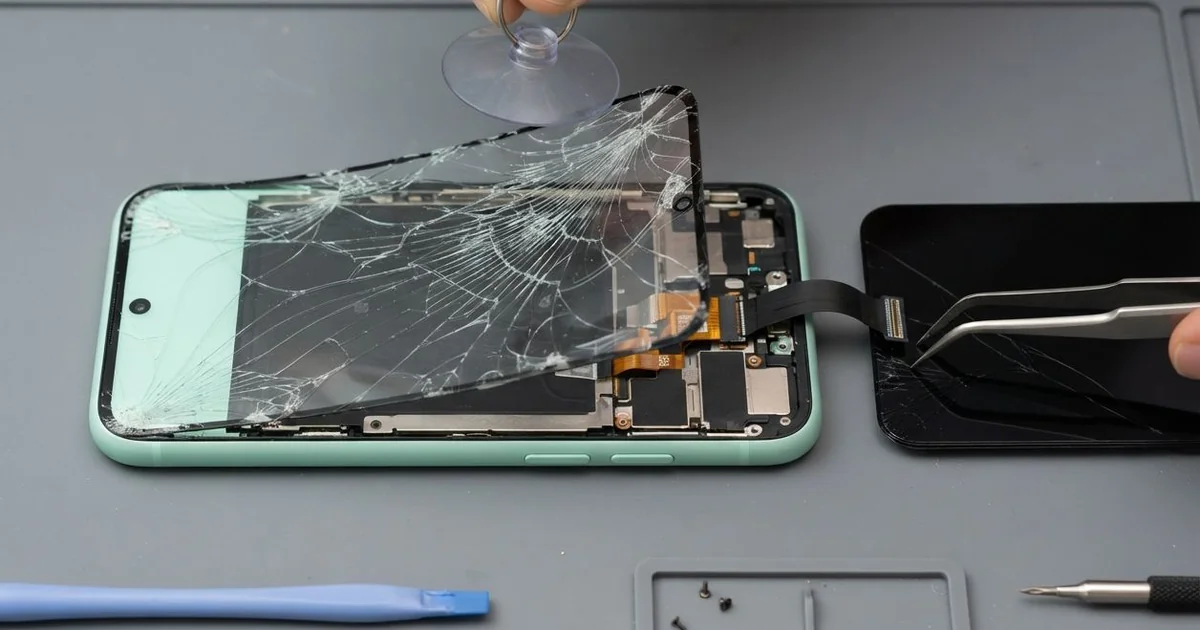
Samsung Galaxy S26 LCD Display Replacement in Al Khobar puts a clear screen back on a cracked phone. We check it free and fit a complete new screen, with the glass and display in one part. Then we test touch and the fingerprint reader, and most jobs are done the same day.
A Samsung S26 broken screen shows up in different ways. Some phones have a clear crack running in from one edge. Others look perfect, yet show a dark blot, a coloured line or taps you never made.
Fixing it soon keeps the job simple and safe. Cracks spread each time the phone is knocked or dropped again. Water and dust also get in through the cracks and can reach the parts beneath.
A few screen faults can be fixed without a new part. A connector shaken loose by a knock can be cleaned and refitted. A lifted screen protector can cause false taps, and a fresh one clears them.
For real cracks, ink, lines or dead touch, a Samsung S26 screen replacement is the answer. The glass and display are made as one glued part on this phone. We fit a complete new screen, so every one of those faults clears in one repair.
How Kabayan Center Replaces a Samsung Galaxy S26 LCD Display
These are the display problems we repair on the Galaxy S26.
- Front glass cracked at a corner or right across the middle
- A dark blot or black ink that grows a little each day
- A line of colour running up or down the display
- Ghost taps that open apps or type letters alone
- Touch that fails along one strip of the screen
- A fingerprint reader that stopped reading after a crack
The screen swap goes like this:
- We check the phone free and note how the cameras, speakers and charging work first.
- We tell you what it needs, and you decide before any work starts.
- We open the back, unplug the battery and keep the phone powered down.
- We warm the front edge, cut through the old glue and remove the broken screen.
- We clear old glue and glass bits from the frame, so the new screen sits flat.
- We connect the new screen, test touch and colour, then seal it with fresh glue.
- You set up your fingerprint again with us and check the phone before leaving.
Have an older or different phone? Our phone screen replacement covers many more models. The shop is on King Fahd Road, and we see customers from Dammam and Dhahran too.
How a Galaxy S26 Screen Breaks: 3 Real Cases
A small crack in a steamy restaurant kitchen
One morning a phone came in from a busy restaurant kitchen. A cook used it for orders, even after a small crack appeared near the bottom. Then it began typing letters and opening apps on its own.
Kitchen steam is hot, wet and greasy. It crept into the crack each shift and settled on the touch layer under the glass. That moisture made the screen feel fingers that weren't there, which we call ghost taps.
"It sent a message by itself to my manager," the cook laughed. That was what finally made the cook bring it in.
The cook had searched for Samsung Screen Replacement in Al Khobar during a break. When we opened the phone, we found a greasy film along the screen connector. A faint white mark had also formed near the edge of the board.
We fitted a new screen and cleaned the connector area carefully. The moisture had reached the board, so we did a light water damage repair clean before sealing. The ghost taps stopped completely.
The cook now keeps the phone in a zip bag during shifts. A crack lets steam in, so fix it early.
Fell from a whiteboard ledge onto a hard floor
A teacher brought this one in between lessons. The phone had sat on the whiteboard ledge and fell when the board was wiped. "There's a green line and it won't go away," the teacher said.
A fall from that height lands on the edge first. The glass held, but the display layer beneath it cracked along one side. That crack cut a row of tiny lights, which left a line on the screen.
The teacher had tried restarting it and turning the brightness up and down. The line stayed in the same place each time, which is typical of display damage.
The teacher had looked for phone repair in Al Khobar near the school. We tested the phone with our own screen, and the picture came up clean. So only the display was damaged, and the rest was fine.
We fitted a new screen and checked touch along every edge. The battery also showed heavy wear, which explained why the phone died before lunch. The teacher agreed to a phone battery replacement in the same visit.
The phone went back to class with a clear screen and a full day of charge. It now lives in a desk drawer during lessons.
Carried with a bunch of keys on long patrols
This one starts in a crowded pocket. A security guard carried the phone with a heavy bunch of keys on long patrols. Deep scratches built up over time, and then a crack appeared.
Keys press hard on the glass with every step. Each scratch weakens it, until one bump against a wall finished the job. The crack ran across the fingerprint area, so the reader stopped working.
"I had to type my code every time I unlocked it," the guard said. The glass also had sharp edges that scratched a thumb on patrol.
We fitted a new screen, and touch and the fingerprint reader worked again. The keys had also scratched the glass over the rear cameras. Photos looked foggy, as if the lens were dirty.
We offered a phone camera repair to replace the scratched lens cover. The guard chose to leave it for now. So the screen is new, but the photos still look soft.
We suggested a case with a raised lip around the cameras. The keys go in the other pocket now. A clip on the belt also keeps them away from the glass.
How to Keep Your Galaxy S26 Screen in One Piece
- Keep keys and coins in a different pocket from the phone.
- Put the phone in a drawer or bag, not on ledges or shelf edges.
- Seal it in a zip bag when you work around steam or water.
- Fit a good screen protector, and change it once it lifts.
- Stop using a cracked screen near water, since moisture seeps in.
- Visit us for mobile repair in Al Khobar when lines or dark spots first appear.
Related services
- Charging port repair if your phone also charges slowly or only at an angle
Questions about this repair
Ask us anything else on WhatsApp
we answer during shop hours.