Samsung Galaxy S26 Motherboard Repair in Al Khobar
Samsung Galaxy S26 Motherboard Repair in Al Khobar for a phone that stays black or loops on the logo. We test it free and explain the fault in plain words. You agree before any work starts, and we don't look through your files.
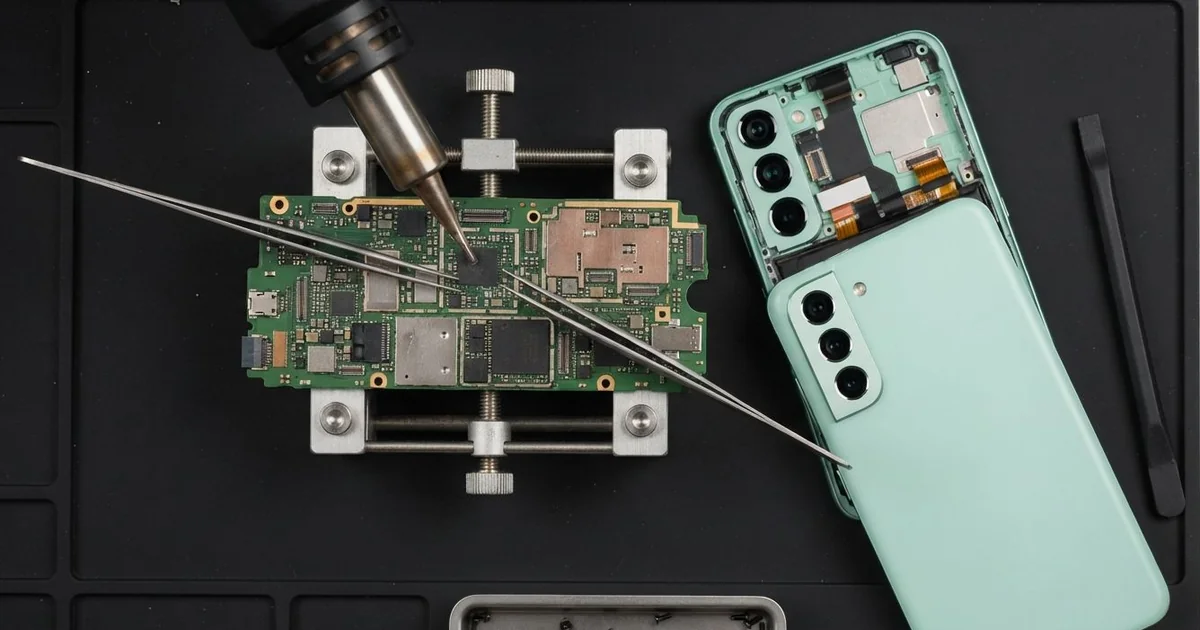
Samsung Galaxy S26 Motherboard Repair in Al Khobar brings back phones that are dead, frozen or restarting. We test the board free and trace the fault to the one part that failed. We repair that part under a microscope, check every function and keep your data safe.
The usual sign is a Samsung S26 not turning on at all. There's no light, no buzz and no charging sign when you plug it in. Other phones freeze on the logo or restart in a loop that never ends.
Stop plugging a dead phone in again and again, hoping it will wake. A short on the board can heat up and hurt nearby parts. After water, rust keeps growing every day the phone sits in a drawer.
Many dead phones don't need board work at all. A flat battery, a failed screen or a loose connector can look exactly the same. We test those first, so the right part gets fixed the first time.
If the fault sits on the Samsung S26 motherboard, we repair the board directly. The board is the main circuit that carries the chips and power lines. We clean corrosion, change burnt small parts and rejoin broken lines with fine tools.
How Kabayan Center Repairs a Samsung Galaxy S26 Motherboard
We repair these board faults on the Galaxy S26.
- A completely dead phone with no charging sign
- A logo loop that keeps restarting the phone
- Corrosion on the board after rain, sea water or steam
- A burnt power chip after a charger surge
- Lost signal, sound or cameras from a failed chip
- Heat from the board while the phone is off
Here is how the board repair runs:
- We check the phone free and rule out the battery, screen and port first.
- We measure power on the board to find exactly where it stops.
- We explain the fault, and you decide before any work starts.
- We take out the board and clean it in a bath that shakes dirt loose.
- Under the microscope, we replace the failed part or rebuild the broken line.
- We refit the board and test power, charging, sound, cameras and signal.
- You check your calls, photos and apps before the phone goes home.
Another phone with the same fault? Our motherboard repair covers many other models. We sit on King Fahd Road, and customers bring phones from Dammam and Dhahran.
What Stops a Galaxy S26 Turning On: 3 Real Cases
An update at home that stopped halfway
A customer came in holding a phone frozen on the logo. An update at home had stopped halfway, and the phone never started again. "I kept holding the buttons, but nothing changed," they said.
An update rewrites the phone's software while it runs. If it stops halfway, the phone can't find a working system to start. Here, though, a weak joint under the memory chip made the update fail.
Weak joints often come from a phone being dropped or bent in a tight pocket. The owner remembered a hard fall on the stairs some time before.
The owner had searched for Samsung Motherboard Repair in Al Khobar late that night. We tried loading fresh software, and it failed at the same point. Our test then found the weak joint under the chip.
The owner wanted the photos above all, so we made a data recovery copy first. Then we melted the solder under that chip again, so it joined properly. The software loaded fully, and the phone started.
Photos, chats and contacts were all still there. The owner now backs up the phone before every update and keeps it above half charge.
A dip in the sea at Half Moon Bay
This one starts at Half Moon Bay. A tour guide waded out for a photo, and the phone slipped into the sea. It came out quickly and still worked, but by evening it was dead.
Salt water is far worse for a board than tap water. It kept working inside, rusting the parts around the power chip. The guide had also left it charging overnight, hoping it would wake.
"It was fine at the beach, so I thought it was safe," the guide said. Salt water often gives no warning in the first hours.
After a search for mobile repair in Al Khobar, the guide brought it straight in. We found white salt crust across the board and a burnt spot near the power chip. We gave it a full water damage repair clean first.
Then we replaced the burnt power part, and the phone turned on. But the salt had ruined the loudspeaker and the rear camera. The guide chose to use it as it was for now.
So the phone works for calls and messages, but not for photos. Salt water needs a board clean quickly, not a night on the charger.
Cold office air, then the hot street outside
We often see this with office staff. A receptionist sat under a strong AC vent all day, then stepped out into the summer heat. The phone went from cold to hot again and again.
When a cold phone meets hot, humid air, water forms inside it. It's the same as drops on a cold glass, and it's called condensation. Day after day, it left a thin layer of rust inside.
The receptionist also kept the phone in a shirt pocket, close to warm skin. That made the change from cold to warm even sharper.
The receptionist first noticed slow charging, then the phone would not turn on. We found rust on the charging pins and around a small power part on the board. The rust had cut the power line to that part.
We rebuilt the power line under the microscope, and the phone started again. The port was corroded too, so we fitted a new one with a charging port repair. Charging came back to full speed.
We suggested keeping the phone in a bag for a few minutes when stepping outside. That lets it warm up slowly, so less water forms.
How to Protect Your Galaxy S26 Motherboard
- Back up your phone before every update, so a failed one never takes your photos.
- Keep the phone in a bag when you walk from cold AC into the heat.
- Switch off a phone that fell in the sea, and don't charge it.
- Use chargers with clear safety marks, not unknown ones.
- Avoid pressing the power button again and again on a dead phone.
- Get phone repair in Al Khobar quickly if the phone ever runs hot while off.
Related services
- Phone battery replacement if the phone starts but the charge drops fast
Questions about this repair
Ask us anything else on WhatsApp
we answer during shop hours.