Samsung Galaxy S26+ Charging Port Repair in Al Khobar
Samsung Galaxy S26+ Charging Port Repair in Al Khobar for a cable that falls out. It also fixes charging that stops when you move the phone. We check the port free and tell you what we see. You decide before we open anything.
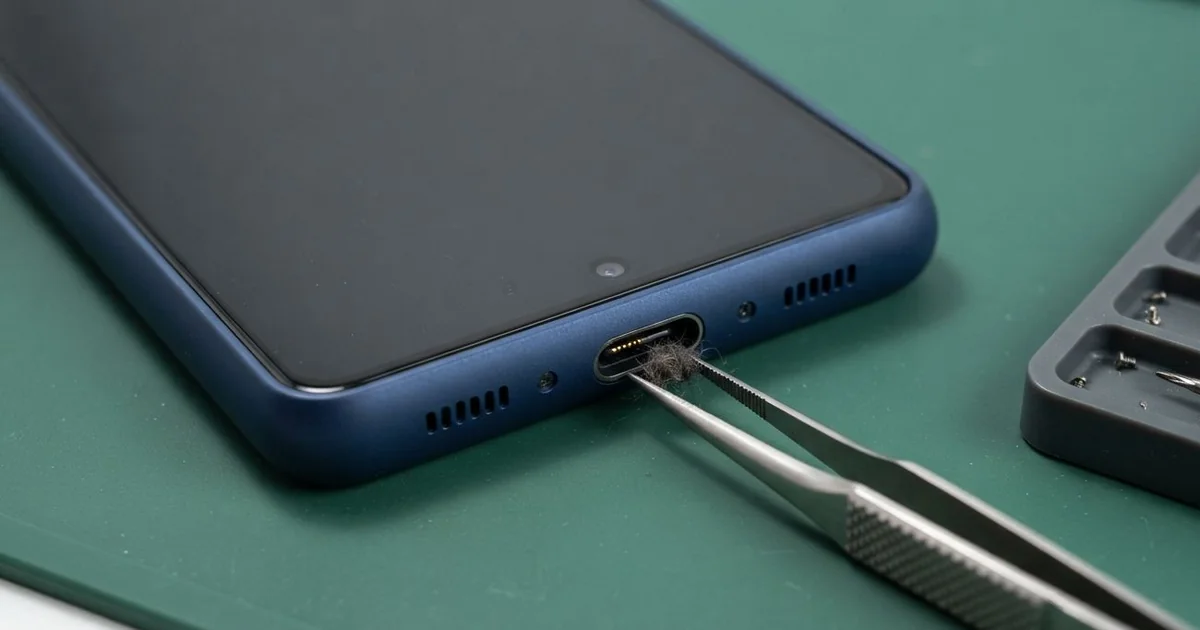
Samsung Galaxy S26+ Charging Port Repair in Al Khobar gets a slow, loose or dead port working again. We check it free, then clean the port or swap its small board. We test cable and fast charging, and most jobs are done the same day.
A Samsung S26 Plus not charging rarely fails all at once. First the plug feels loose, or you must hold it at an angle. Then charging starts and stops, or a moisture warning appears on a dry phone.
Try not to wait. A loose plug can spark inside the port and slowly burn the pins. If the battery runs flat and stays flat, the phone can't even turn on to back up your photos.
Plenty of port faults only need a careful clean. Lint, sand and dust pack into the bottom, so the plug can't go all the way in. We lift the dirt out with fine plastic picks, never a metal pin.
Worn, bent or burnt pins need more than cleaning. The Samsung S26 Plus charging port sits on a small board, linked to the main board by a flex cable. We replace that small board and keep the rest of your phone as it is.
How Kabayan Center Repairs a Samsung Galaxy S26+ Charging Port
These are the port faults we fix on this model.
- A cable that slips out or needs holding at an angle
- Charging that starts and stops by itself
- A moisture warning on a phone that is already dry
- Fast charging that no longer switches on
- Sand, lint or dust packed deep in the port
- Pins that are bent, dark or burnt
The repair goes like this, step by step:
- We look inside the port with a magnifier and test it with our own cable.
- We tell you if it needs a clean or a new part, and you decide.
- For dirt, we pick it out with plastic tools and a safe cleaning liquid.
- For damaged pins, we lift the back glass and disconnect the battery first.
- We swap the small charging board and check its flex cable for tears.
- We seal the back with fresh glue and test cable, fast and wireless charging.
Charging trouble on a different phone? Our charging port repair covers other models as well. Our shop sits on King Fahd Road, and people drive in from Dammam and Dhahran too.
How a Galaxy S26+ Port Stops Charging: 3 Real Cases
A heavy car cable on a long drive
A family came to us after a long road trip across the desert. The phone had charged from the car socket the whole way, running maps. A long, heavy cable hung down from the port to the floor, swinging with every turn.
"By the end, it only charged if I held it," the driver told us. Every bump in the road tugged on the heavy cable. The plug worked like a lever on the port, again and again.
Inside, the metal shell of the port had widened, and the plug no longer gripped. A clean would not help here. So we replaced the small charging board and tested a new cable in it.
The battery reading also looked poor. Hours of charging on a hot dashboard had worn it down, and it lost charge fast. The family chose a phone battery replacement at the same visit.
The phone now charges firmly from any cable. We suggested a short cable and a mount that holds the phone upright. That way, no weight hangs from the port while the car moves over rough roads.
It is a small change that saves the port. It also keeps the plug from working loose.
Fine sand packed in after a sandstorm
Sandstorms fill phone ports faster than people think. A security guard worked at an outdoor gate through a strong sandstorm. The phone stayed in a trouser pocket all shift, with nothing covering the port.
That night it would not charge at all. The guard had searched for Samsung Charging Port Repair in Al Khobar, sure the port was broken. They had already tried pushing the plug in harder, and then tried a second charger.
Under the magnifier, the port was packed with pale sand. Pushing the plug had pressed it into a hard layer at the back. The plug could only go in halfway, so the pins never touched.
We picked the sand out slowly with plastic tools and a little cleaning liquid. No part was needed, and every pin was straight. The phone took fast charging again as soon as we plugged it in.
Never dig in a port with a pin or a toothpick. Metal scratches the pins, and wood can snap off inside. The guard now keeps the phone in a zipped pocket on windy days.
A small rubber plug for the port helps too. It keeps sand out when the wind picks up.
A frayed cable that sparked
One evening a phone came in smelling of burnt plastic. A university student had kept using a cable with its outer skin torn open near the plug. Thin wires showed through the tear.
"It flashed when I plugged it in, then nothing," the student said. They had typed mobile repair in Al Khobar into a map and walked in. A damaged cable can short inside the port and send power the wrong way.
One pin had a black burn mark, and the plastic around it had melted. We replaced the small charging board, but the phone still would not charge. The problem was deeper than the port.
Our tests showed the short had damaged a small charging chip on the main board. That needed a motherboard repair, so we replaced the burnt chip. Cable charging came back after that.
Wireless charging did not return, since a nearby part had burnt as well. The student chose to leave it for now and charge by cable only. The torn cable went straight into our bin.
We showed the student how to spot a worn cable before it sparks.
How to Keep Your Galaxy S26+ Charging Port Clean
- Pull the plug out straight, holding the plug and not the cable.
- Use a short cable in the car, so nothing heavy hangs from the port.
- Throw away any cable with a torn skin or bare wires showing.
- Keep the phone in a closed pocket or bag during dust and sandstorms.
- Let the phone dry fully when it shows a moisture warning.
- Bring it for phone repair in Al Khobar at the first loose feeling, before the pins burn.
Related services
- Water damage repair for a port that got wet and turned green
- Phone screen replacement if the same phone took a fall and cracked
Questions about this repair
Ask us anything else on WhatsApp
we answer during shop hours.