Samsung Galaxy S26 Ultra LCD Display Replacement in Al Khobar
Samsung Galaxy S26 Ultra LCD Display Replacement in Al Khobar for shattered glass or spreading ink. We also fix lines, dead touch and a pen that stops writing. We look at your phone free, and you decide before any work starts.
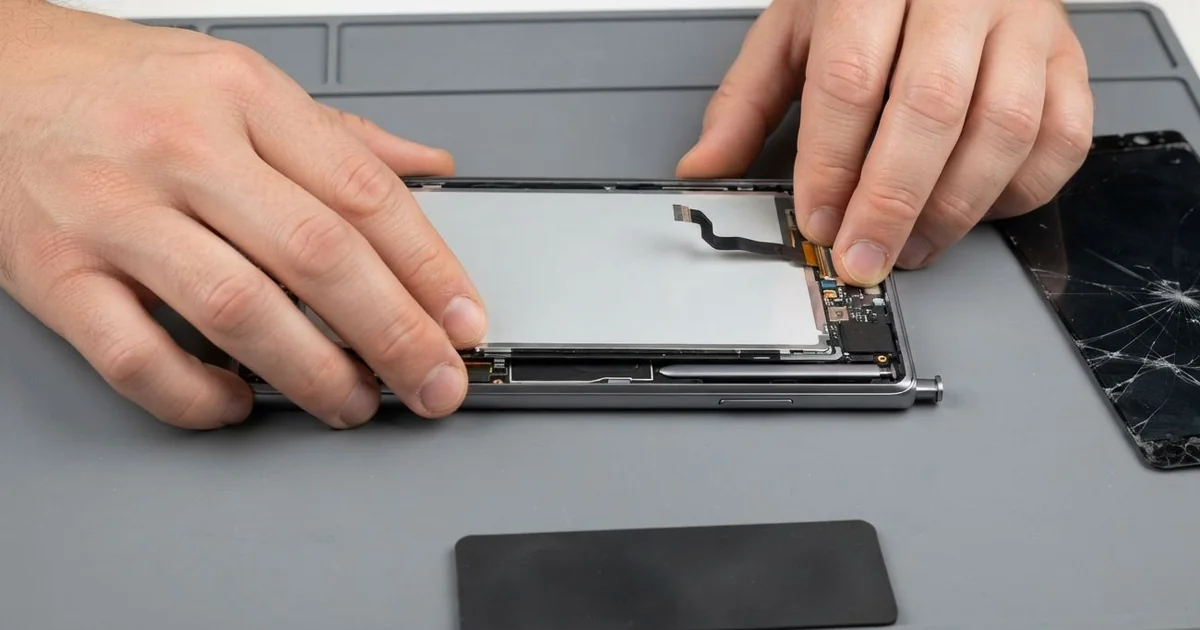
Samsung Galaxy S26 Ultra LCD Display Replacement in Al Khobar fixes a cracked or dark screen. We check the phone free and fit a complete new screen, with the glass and display joined. We test touch, the S Pen and the fingerprint reader, and most jobs are done the same day.
A Samsung S26 Ultra broken screen is not always a crack you can see. Sometimes a green line appears after a knock. Other times the glass is fine, but a black patch slowly spreads from one edge.
Waiting rarely helps. Cracks grow a little with each press and each hot day, and the display behind them fails next. Because the fingerprint reader sits under the screen, a dark display can also lock you out.
Some problems don't need a new screen. A cracked protector, a worn pen tip or a loose connector can cause odd touches. We check these first and fix them when that is all it takes.
Real cracks, ink and lines need a full new part. The glass and display are one glued piece, so we can't swap the glass alone. A Samsung S26 Ultra screen replacement puts in a whole new screen and clears these faults together.
How Kabayan Center Replaces a Samsung Galaxy S26 Ultra Screen
Here are the screen faults we repair on this phone.
- Shattered glass, or a crack spreading from one corner
- Black ink or dark patches that grow each day
- Lines of colour running across the display
- Touch or the S Pen not working in one area
- A screen that flickers, or stays dark while the phone runs
- Fingerprint unlock failing after a crack
These are our steps for this repair:
- We check the phone free and note what works, from cameras to speakers.
- We explain the fault and the fix, and you decide before any work starts.
- We take out the S Pen, lift the back and disconnect the battery.
- We warm the old screen evenly and lift it without bending the frame.
- We clean old glue and glass dust from the frame, then fit and test the new screen.
- We bond the screen with fresh glue and hold it under even pressure.
- We set up your fingerprint again and test touch and the pen in every corner.
Another phone with a broken screen? Our phone screen replacement covers many other models. Our shop is on King Fahd Road, and we often see customers from Dammam and Dhahran.
How a Galaxy S26 Ultra Screen Breaks: 3 Real Cases
Blown off a balcony rail
A customer came to us holding the phone in a plastic bag full of glass bits. They had rested it on a balcony rail while hanging out the washing. A gust of wind caught the laundry, and the phone dropped to the tiles below.
"I heard it land before I saw it," they told us. The front glass was shattered from corner to corner. The screen still lit up, but touch only worked in the middle.
They had searched for Samsung Screen Replacement in Al Khobar while picking up the pieces. A fall from that height can bend the frame slightly. So we checked the frame edges against a flat steel ruler before fitting anything.
The frame was still straight, so we fitted a new screen and set up the fingerprint again. In testing, zoomed photos came out cloudy. The glass over one back camera had cracked in the same fall, so we did a phone camera repair too.
The phone left with a clear screen and sharp zoom photos again. Never rest a phone on a rail, a ledge or a car roof. The customer now keeps it indoors while hanging the washing.
Struck a metal bed frame on a hospital ward
We often see this with nurses. One nurse bent over a patient's bed, and the phone slipped from a top pocket. It hit the metal bed frame corner first, then fell to the floor.
At first there was only a tiny chip at one corner. Shift after shift, a thin line crept out from it across the glass. Then a green patch appeared under the line, and touch there stopped working.
A chip at the corner weakens the whole sheet of glass. Every press and every warm pocket lets the crack grow a little more. The display under it soon follows.
We fitted a new screen and cleaned glass dust out of the S Pen slot. Touch and the pen worked across the whole screen again. The nurse had found us by looking up mobile repair in Al Khobar during a break.
One thing stayed, though: the metal frame had a small dent at the corner that hit the bed. It didn't affect how the phone works, so the nurse chose to leave it. A case with a clip strap now keeps the phone fixed to the uniform.
Tipped off a tripod clamp during a shoot
This one starts at a video shoot in a hotel lobby. A content maker had the phone on a small tripod, filming all afternoon. The clamp slowly loosened, and the phone tipped onto the hard stone floor.
The glass cracked in a star shape near the top. "It still films, but I can't see what I'm filming," they said. Black ink was spreading from the star toward the middle.
A star crack means the impact hit one small point hard. The display layer under that point breaks first, and the ink leaks out from there. We replaced the whole screen, since the glass and display are one part.
The content maker also said the phone died before sunset on shoot days. Our test showed the battery badly worn from filming while it charged. A phone battery replacement would fix that, but they had a deadline and booked it for later.
So the phone went back to work with a sharp new screen and the old battery. We suggested a clamp with a screw lock, and checking it between takes. A power bank on the tripod leg keeps shoots going until the battery is changed.
How to Keep Your Galaxy S26 Ultra Screen Safe
- Keep the phone away from rails, ledges and car roofs, even for a moment.
- Use a case with a raised lip, and a strap if you work on your feet.
- Tighten tripod clamps often, and never leave a mounted phone unwatched.
- Keep the S Pen slot free of sand, dust and glass bits.
- Back up photos and videos while the screen still works.
- Bring it for phone repair in Al Khobar when a chip appears, before it becomes a crack.
Related services
- Water damage repair if water got in through a cracked screen
- Charging port repair for a phone that charges only at an angle
Questions about this repair
Ask us anything else on WhatsApp
we answer during shop hours.