Samsung Galaxy S8 Battery Replacement in Al Khobar
Samsung Galaxy S8 Battery Replacement in Al Khobar for a phone that dies by lunch or shuts down early. We check your battery free and tell you what it needs. You decide before any work starts, and your photos and chats stay on the phone.
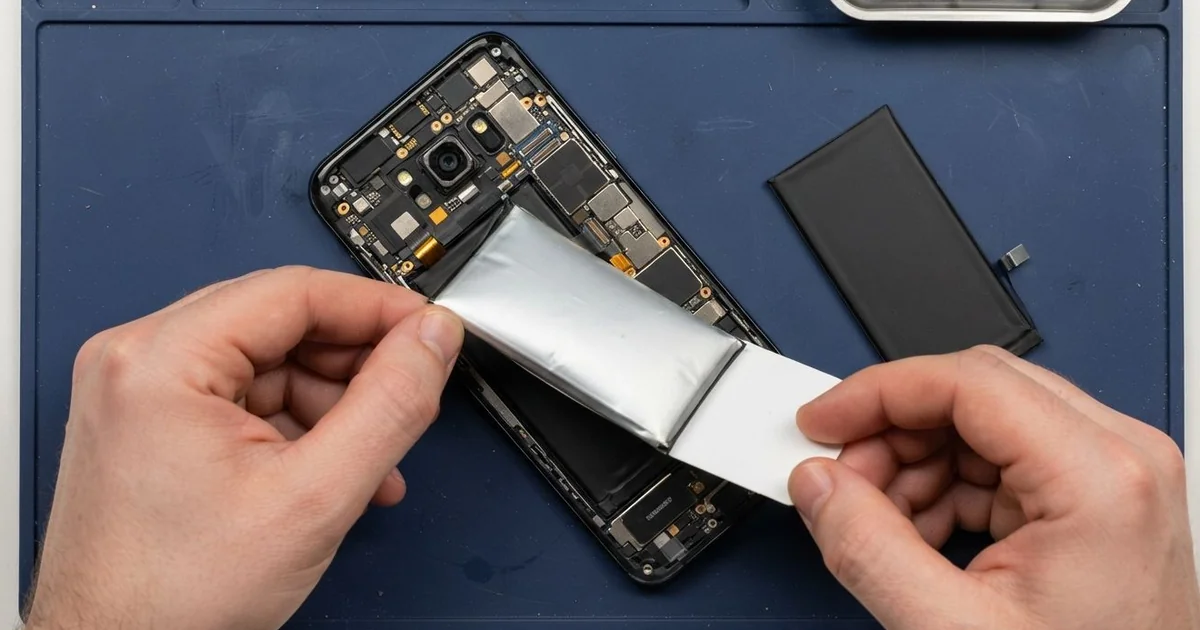
Samsung Galaxy S8 Battery Replacement in Al Khobar fixes a phone that drains fast, dies early or swells. We check the battery health free, then fit a new battery under the back glass. We seal the glass with fresh glue and test charging, and most jobs are done the same day.
A Samsung S8 battery draining fast is the most common sign. The phone is full in the morning and nearly empty by lunch. Some phones switch off at 30% or restart when you open the camera.
It's better not to wait. An old battery can swell, and then it pushes the back glass away from the frame. A swollen battery can catch fire, so stop charging the phone once the back starts to lift.
Not every drain needs a new battery. An app stuck running in the background can empty a healthy battery in hours. A bright always-on screen does the same, so we check the settings first.
A worn or swollen battery is different. It sits under glued back glass, so it's not a safe job to do at home. A Samsung S8 battery replacement puts in a new battery and a fresh seal, so the phone lasts all day.
How Kabayan Center Replaces a Samsung Galaxy S8 Battery
We fix these battery faults on this phone.
- A battery that is empty by midday, even with light use
- A phone that shuts down at 20% or 30% without warning
- Sudden restarts when you open the camera, a game or a video call
- A swollen battery that lifts the back glass at one corner
- A phone that gets hot while charging or sitting in your pocket
- Charging that stops at one level and won't go higher
Here is how a Samsung S8 battery replacement works with us, step by step:
- We check the phone free and read the battery health, the charge speed and what drains it.
- We tell you what it needs, and you decide before any work starts.
- We warm the back glass to soften the glue, then lift it slowly so it doesn't crack.
- We disconnect the old battery first, then ease it out without bending it or the board.
- We fit the new battery, connect it and clean every bit of old glue from the frame.
- We seal the back glass with fresh glue and press it evenly for a tight fit.
- We test cable charging, wireless charging and the fingerprint sensor, then you check the phone yourself.
Own a different model? Our phone battery replacement service covers other phones, with much the same steps. Customers come to our shop on King Fahd Road from Dammam and Dhahran too.
Why a Galaxy S8 Battery Wears Out: 3 Real Cases
Charged under the pillow every night
A nurse on night shifts came to us with a phone that wouldn't sit flat on the table. "It dies before my shift is over," the nurse told us.
Every morning after work, the phone went on charge under the pillow. The pillow trapped the heat, and heat wears a battery out fast. Over time, the old battery started to swell.
During a break, the nurse had typed Samsung Battery Replacement in Al Khobar into the dying phone. When we opened it, the battery was puffed up like a small cushion. It had pushed the back glass up at one corner.
We fitted a new battery and sealed the back with fresh glue. We showed the nurse the old battery next to the new one, and the bulge was easy to see. The swelling had also pressed on the screen from behind and left a pale mark in the middle.
The nurse reads a lot on the phone, so we also did a phone screen replacement. Now the phone lasts a full shift, and it charges on the bedside table instead.
A blocked port that looked like a dead battery
We often see this one: the battery looks dead, but the real fault sits lower down. A delivery driver brought in a phone that died halfway through every route. It was needed all day for maps and calls.
"I charge it all night and it's still at half," the driver said. The cable only worked when it was held at an angle. At night it kept slipping, so the phone charged in short bursts.
The driver had looked for mobile repair in Al Khobar and expected to buy a new battery. Under the light, we saw the port packed with grey pocket lint. Each time the plug went in, it pressed the lint in tighter.
We cleaned the port, but one of the small pins inside was bent. So we did a charging port repair first. The battery test also showed heavy wear, so the driver chose a new battery as well.
Now the phone charges fast from a normal cable and lasts the whole route, maps and all. The driver keeps it in a zipped pocket, away from the dust on the van floor.
Sea water through a cracked back
This one starts on the beach at Half Moon Bay. A student dropped the phone on the rocks, and the back glass cracked in one corner. Later, the phone went into a bag with a wet towel.
A few days later, the battery emptied in a single morning and the phone felt warm. The student had tried to dry it with a hair dryer. That only pushed the salty water deeper inside, and the drain got worse.
Salt water is worse than tap water, because the salt keeps eating the metal. Inside, we found green crust on the battery connector and white marks on the board. A new battery alone would not have fixed this.
So we did a water damage repair first, to clean the board and stop the rust. Then we fitted a new battery and a new back glass, sealed with fresh glue.
The phone now charges normally and lasts the day again. The loudspeaker at the bottom stayed weak, though, because the salt had reached it too. The student chose to use earphones for now and fix the speaker later.
How to Keep Your Galaxy S8 Battery Healthy
- Charge between 20% and 80% when you can, instead of always to full.
- Charge on a hard, open surface, never under a pillow or a blanket.
- Keep the phone out of a hot car in summer. Heat ages a battery faster than anything else.
- Use a good cable and charger, and keep the port free of lint.
- Turn off the always-on screen if you don't need it, and check which apps use the most battery.
- Stop charging if the back starts lifting, and bring it for phone repair in Al Khobar straight away.
Related services
- Motherboard repair for a phone that still won't turn on with a new battery
Questions about this repair
Ask us anything else on WhatsApp
we answer during shop hours.