Samsung Galaxy S8+ Battery Replacement in Al Khobar
Samsung Galaxy S8+ Battery Replacement in Al Khobar for a phone that won't last the day. Some switch off without warning, even at half charge. We check it free and tell you what it needs, and you decide before any work starts.
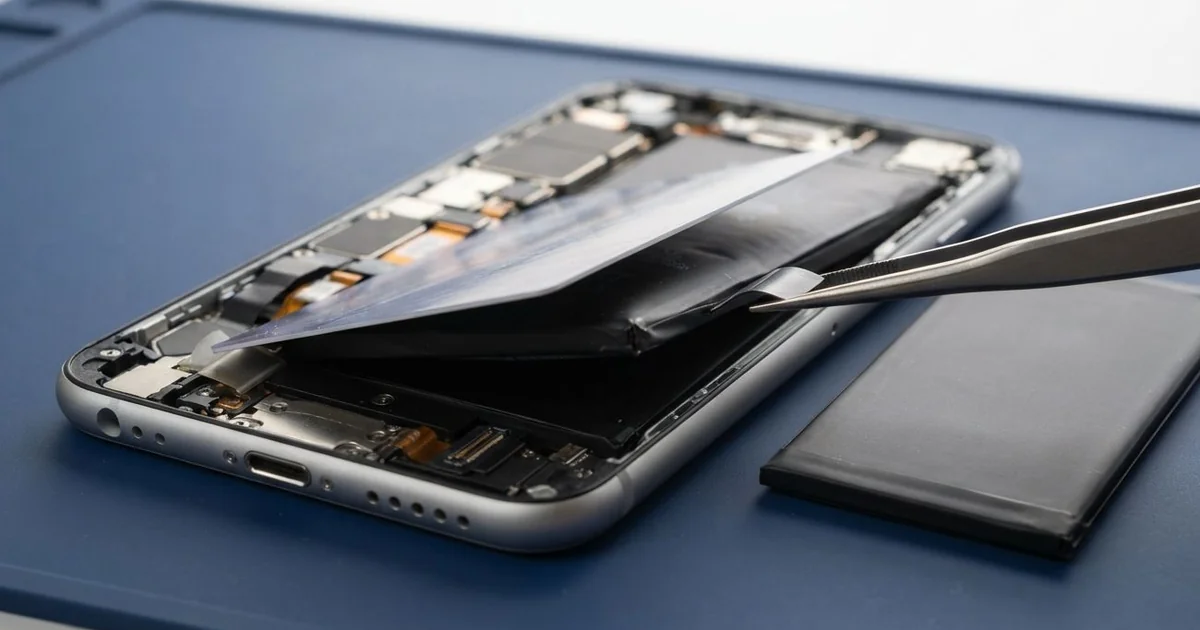
Samsung Galaxy S8+ Battery Replacement in Al Khobar brings back a full day of charge. We check the battery free, and if it's worn, we fit a new one. We reseal the back glass and test charging, and most jobs are done the same day.
A Samsung S8 Plus battery draining fast is easy to notice. You charge it fully, and by the afternoon it needs the charger again. Some phones also get warm in the pocket while they sit doing nothing at all.
Waiting makes it worse. A tired battery works harder and gets hotter, and that heat slowly makes it swell. A swelling battery pushes the back glass loose, and it can catch fire if it is punctured.
Short battery life doesn't always mean a bad battery. Sometimes one app keeps the phone awake all night and eats the charge. We look at the battery use screen first, and a settings change may be all it needs.
If the battery is worn, it has to come out. It is glued in under the back glass, so the phone must be opened slowly and with care. A Samsung S8 Plus battery replacement gives you a new battery and a fresh seal in one visit.
How Kabayan Center Replaces a Samsung Galaxy S8+ Battery
We fix these battery faults on this phone.
- Charge that runs out before the end of the day
- Shutting down at 15% or 20% for no clear reason
- A phone that won't turn on at all after being left flat
- Back glass that lifts because the battery has swollen
- Heat around the camera while charging or on calls
- Very slow charging, even with a good charger
These are the steps we follow for this battery:
- We check the phone free, test the battery and see which apps use the most power.
- We explain what we found, and you decide before any work starts.
- We heat the back glass evenly, then open it slowly with thin plastic tools.
- We remove the inner cover, unplug the battery and ease the old one out without bending it.
- We fit the new battery, plug it in and clean the old glue from the frame and glass.
- We lay fresh glue and press the back glass flat, so it seals well.
- We test charging by cable and on a wireless pad, and check the fingerprint sensor beside the camera.
Using a different model? Our phone battery replacement service covers most other phones, with similar steps. Customers reach our King Fahd Road shop from Dammam and Dhahran as well.
Why a Galaxy S8+ Battery Fails Early: 3 Real Cases
An unbranded power bank from a market stall
A customer came to us holding a warm phone and a small power bank. The power bank had no brand name and came from a stall at a weekend market. "It charges, but the phone gets very hot," the customer said.
Unbranded power banks often send out uneven power. The battery takes the hit and heats up every time it charges. After months of this, the battery was worn and slightly swollen.
The phone died during a call, so the customer searched for Samsung Battery Replacement in Al Khobar. When we opened it, the battery had a soft bulge in the middle. We replaced it and sealed the back again.
The uneven power had harmed the port too. The pins inside were dark, and the plug felt loose. So we did a charging port repair along with the battery.
The phone now charges cool and lasts the day again. The customer threw the power bank away and bought one from a proper electronics shop. We also showed the customer the swollen battery, flat on the bench next to the new one.
A spare phone left flat in a drawer
This one starts in a drawer. A parent kept the old phone as a spare and forgot it there for many months. When the family finally needed it, nothing happened.
"It won't even show the charging light," the parent told us. A battery left empty for months slowly drains below a safe level. The phone then refuses to charge it, to protect itself.
We tried a slow, careful charge first to wake it, but the battery stayed dead. So we fitted a new one, and the phone switched on straight away. All the old photos and messages were still there, to the family's relief.
The screen, though, had a pink shadow along one edge. Heavy books and tools in the drawer had pressed on it for a long time. The family chose to leave it, since the phone was only a spare.
The phone works and holds its charge now, but the shadow stays. We noted that a phone screen replacement can be done later if it grows. The family also moved the spare to a shelf, where nothing presses on it.
Nightly video calls home while charging
We often see this with people who call family abroad every night. A site supervisor made long video calls after work, with the phone on the charger the whole time. The calls often ran long into the night.
"By morning it's full, but it's empty by lunch," the supervisor said. Video calls work the screen, the camera and the chip hard. Charging at the same time traps even more heat inside.
The supervisor had looked up mobile repair in Al Khobar and brought the phone in on a day off. We found the battery badly worn. The back glass was also lifting at one corner.
Behind the loose glass, we saw faint white marks near the battery plug. Sweat and humid summer air had crept in through the gap. So we did a water damage repair clean before fitting the new battery.
The phone now lasts through a working day and the evening call. We suggested calling without the charger, with the phone resting on a cool table. Charging after the call, on a hard surface, keeps the heat down.
How to Keep Your Galaxy S8+ Battery Healthy
- Buy chargers and power banks from a proper shop, not unbranded ones from a stall.
- Unplug the phone during long video calls or games, so it doesn't overheat.
- Charge a spare phone to about half every few months if you keep it in a drawer.
- Keep the charge between 20% and 80% on most days.
- Turn on power saving mode when you know it'll be a long day.
- Stop using the phone if the back glass lifts, and bring it for phone repair in Al Khobar.
Related services
- Motherboard repair for a phone that won't power on even with a new battery
Questions about this repair
Ask us anything else on WhatsApp
we answer during shop hours.