Samsung Galaxy S8+ Charging Port Repair in Al Khobar
Samsung Galaxy S8+ Charging Port Repair in Al Khobar for a cable that wobbles or won't charge. We check the port free and tell you what it needs. You decide before any work starts, and your data stays untouched.
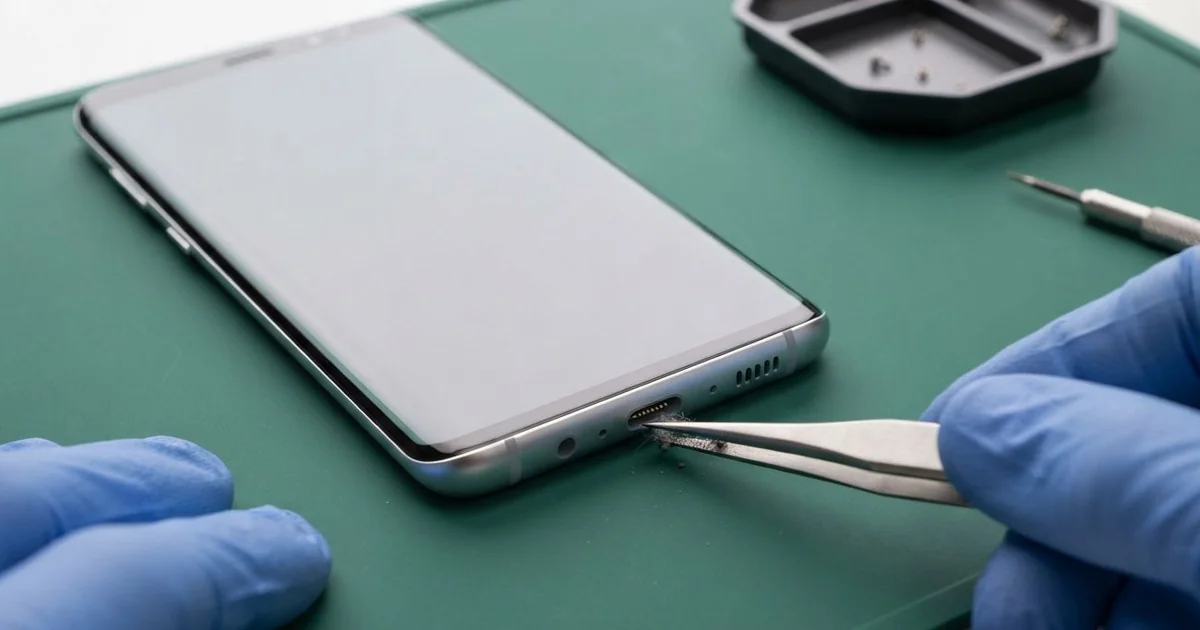
Samsung Galaxy S8+ Charging Port Repair in Al Khobar fixes a phone that charges slowly or not at all. We check the port free and clean it first, or replace the small port board if a pin is bent. Most jobs are done the same day, while you wait nearby.
A Samsung S8 Plus not charging is a worrying sight. The cable goes in, but nothing happens, or it charges only at one angle. Sometimes a moisture warning blocks charging, even when the phone looks and feels completely dry.
It's best to fix it early. A loose plug sparks a little each time it moves, and that burns the pins. In time the damage can reach the main board, which is a bigger and longer repair.
Many ports only need cleaning. Pocket lint, sand and dust slowly pack into the bottom and stop the plug from going all the way in. We clean it with safe tools, never with a pin or a needle.
A bent pin or a loose socket is different. The Samsung S8 Plus charging port sits on a small board at the bottom of the phone. We replace that board, and the plug clicks in firmly and charges at full speed again.
How Kabayan Center Repairs a Samsung Galaxy S8+ Charging Port
We fix these charging faults on this phone.
- No charging at all, with the cable pushed fully in
- Charging only when the cable is held at an angle
- A "moisture detected" warning that won't go away
- Fast charging that has stopped working
- A loose plug that falls out with a light touch
- A computer that no longer sees the phone over the cable
Here is how we repair the port, step by step:
- We check the phone free, look into the port with a light and test it with our own cable.
- We tell you what we found, and you decide before any work starts.
- We clean out lint, sand or crust with plastic picks and a little cleaning alcohol.
- If cleaning isn't enough, we open the back glass and unplug the battery.
- We swap the small port board at the bottom and reconnect its cable to the main board.
- We reseal the back glass with fresh glue and press it flat.
- We test cable charging, fast charging and wireless charging before you take the phone.
Have a different model? Our charging port repair service covers other phones and laptops too. People bring their phones to our King Fahd Road shop from Dammam and Dhahran as well.
Why a Galaxy S8+ Stops Charging: 3 Real Cases
Sand from a desert camping trip
A customer came to us after a camping trip in the desert. The phone had spent the nights on a sandy blanket in the tent. "It worked fine out there, and now it won't charge," the customer said.
Fine sand is the problem. It slips into the port, and every time the plug goes in, it's pushed deeper. Soon the plug can't reach the pins at all.
Under the light, we saw a hard layer of sand at the back of the port. We picked it out slowly with thin plastic tools, bit by bit. Then the plug went in fully again and the phone started charging.
But charging was still slow, and the battery test explained why. The phone had run flat many times on the trip, and the old battery was badly worn out. The customer chose a phone battery replacement as well.
Now the phone charges in normal time and lasts the whole day. For the next trip, the customer packed a small zip bag to keep the phone free of sand. It's a simple habit that keeps the port clear.
"Moisture detected" after hot showers
This one starts in the bathroom. A teacher played music on the phone during long, hot showers every morning. One morning, a warning said moisture was detected, and charging stopped.
"It's not even wet," the teacher said. Steam turns into tiny water drops inside the cool port. Over many weeks, those drops dry and leave a green crust on the pins.
The teacher had typed Samsung Charging Port Repair in Al Khobar and found us nearby. Inside the port, we saw green marks on almost every pin. A little rust had also spread to the board beside it.
We replaced the port board and checked the parts around it. The rust had gone a bit further, so we did a water damage repair clean on that area too. Rust spreads slowly, so catching it early saved the board.
The warning is gone and the phone charges normally again, at full speed. The bottom mic still sounds a little quiet on calls, because the steam reached it too. The teacher chose to leave it for now and plays music from outside the bathroom.
A cable yanked out in the car
We often see this with drivers. A sales rep kept the phone charging on a car mount, with the long cable hanging down to the floor. Getting out in a hurry, the rep's bag caught the cable and pulled it sideways.
"Now the cable just falls out," the rep told us. A sideways pull bends the socket inside the port. The pins stop touching the plug, even when it looks fine from the outside.
The rep had found us by searching for mobile repair in Al Khobar. We saw that the metal socket was bent and cracked where it joins the small port board. So we fitted a new port board and tested it with several cables.
During the test, the phone kept restarting on the charger. The hard pull had also loosened a tiny part on the main board, next to the port connector. We did a motherboard repair to fix it.
The phone now charges firmly on the car mount again. The rep now uses a shorter cable that doesn't hang down. A short cable can't catch on a bag or a seat belt.
How to Keep Your Galaxy S8+ Charging Port Clean
- Keep the phone in a pocket or bag free of sand and lint, or use a port cover.
- Unplug by holding the plug, never by pulling the cable.
- Leave the phone outside the bathroom when you shower.
- Let a wet port dry by itself before you charge it. Don't blow hot air into it.
- Never clean the port with a pin, a toothpick or a needle.
- Use a good cable, and bring it for phone repair in Al Khobar once the plug starts to wobble.
Related services
- Phone screen replacement for a cracked or dark display
Questions about this repair
Ask us anything else on WhatsApp
we answer during shop hours.