Samsung Galaxy S9 Charging Port Repair in Al Khobar
Samsung Galaxy S9 Charging Port Repair in Al Khobar for a cable that wiggles, drops out or won't charge. We check your phone free and tell you what it needs. You decide before any work starts, and your data stays on the phone.
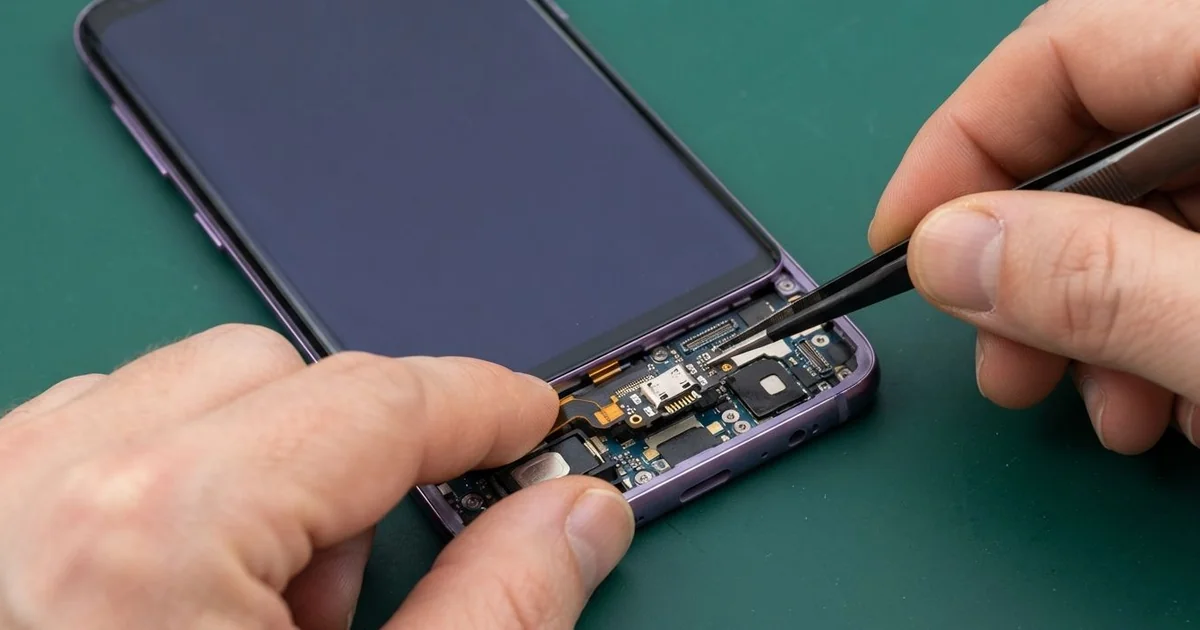
Samsung Galaxy S9 Charging Port Repair in Al Khobar fixes a phone that charges slowly, loosely or not at all. We check the port free, then clean it, repair it or fit a new port board. We test fast charging and data, and most jobs are done the same day.
A Samsung S9 not charging usually gives small warnings first. The cable must sit at an angle, or fast charging stops and charging takes all night. Sometimes the phone shows a small water drop and refuses to charge, even when it's dry.
Don't wait until it stops completely. A loose plug makes tiny sparks inside the port, and over time they burn the pins black. A phone that can't charge can't back up your photos and chats either.
Many ports only need a careful clean. Dust and lint pack down at the back, so the plug can't go all the way in. We clear it with fine tools, never with a metal pin or any liquid.
Some ports are worn, bent or rusty. On this phone, the Samsung S9 charging port sits on a small board at the bottom. We fit a new port board, and the plug holds firmly again.
How Kabayan Center Repairs a Samsung Galaxy S9 Charging Port
We fix these charging faults on this phone.
- A cable that only works at an angle, or falls out easily
- Slow charging, or fast charging that no longer switches on
- The "moisture detected" warning when the port is dry
- No cable charging at all, while wireless charging still works
- A computer that doesn't see the phone over the cable
- Bent, burnt or green pins inside the port
Here is how the repair works with us, step by step:
- We check the port free with a light and a magnifier, and test the charge speed.
- We tell you what it needs, and you decide before any work starts.
- If it's only dirt, we clean the port with fine plastic tools.
- If the port is damaged, we heat and lift the back glass and disconnect the battery.
- We take out the small port board at the bottom and fit a new one.
- We test fast charging, cable data, the microphone and the headphone socket.
- We reseal the back glass with fresh glue, then you check the phone yourself.
Using a different phone? Our charging port repair service covers other models too. People drive in from Dammam and Dhahran to our shop on King Fahd Road for this.
Why a Galaxy S9 Stops Charging: 3 Real Cases
Dust from a construction site
A site engineer brought in a phone that had spent the whole summer on a building site. "It charges, then it stops, then it starts again," the engineer said.
Fine cement dust and sand blow everywhere on a site. They get into pockets, and then into the port.
Each time the plug goes in, it packs the dust tighter at the back. After a few months, the plug can no longer reach the pins.
The engineer had searched for Samsung Charging Port Repair in Al Khobar during a lunch break. Under our magnifier, the port looked grey and almost full. The plug could only go halfway in.
We cleaned it out carefully, and the plug clicked in firmly again. But our test showed the battery was very weak too. Months of stop-start charging in the heat had worn it down.
So we also did a phone battery replacement and resealed the back. Now the phone charges in one go and lasts the full shift.
The engineer keeps it in a zipped pouch on site. A quick look into the port each week now catches any dust early.
A moisture warning after rain at the car wash
This one starts on a rare rainy day. A customer stood outside at a car wash in the rain, phone in hand. Later, the phone showed a water drop and said moisture was detected in the port.
The warning stayed for days, even after the phone looked dry. The customer tried a hair dryer on the port, then tried charging anyway. A phone showing the moisture warning should not be charged by cable.
Inside, the rain and car wash spray had mixed with dirt and soap. We found green crust on two pins and wet marks on the port board. So we did a water damage repair to clean the board and stop the rust.
Then we fitted a new port board, and cable charging came back. The warning is gone, and the headphone socket on the same board works again. Fast charging switched back on during our test.
The loudspeaker next to the port had rusted too, though. It still sounds a little rough on loud music.
The customer chose to leave it for now and come back for it later. Calls and alarms are still loud enough for daily use.
A thick cable forced in again and again
We often see this after someone buys a bulky cable from a market stall. The plug was thicker than normal, so it never slid in easily. The customer, a student, pushed it in hard every night.
Over time the port loosened, and the cable began falling out on its own. "Now it won't charge unless I hold it," the student said. The student had typed mobile repair in Al Khobar and walked in the same afternoon.
The thin tongue inside the port was bent, and one pin was burnt black. The burning came from the loose plug making tiny sparks each time it moved.
We checked the board before anything else, because a burnt pin can send power where it shouldn't. A small part near the port was damaged, so we did a motherboard repair on that area first. Then we fitted a new port board and tested fast charging.
The phone now charges firmly with a good cable. We handed back the bulky cable and suggested a proper one instead. A good plug should slide in with a soft click, without any push.
How to Keep Your Galaxy S9 Charging Port Clean
- Keep the phone in a zipped pocket or pouch in dusty places.
- Use a good cable with a plug that slides in easily, never one you must force.
- Hold the plug, not the wire, when you pull it out.
- Let the port dry fully if you see the moisture warning, and use wireless charging meanwhile.
- Never push a pin, needle or toothpick into the port.
- Bring it for phone repair in Al Khobar as soon as the cable feels loose.
Related services
- Phone screen replacement for a cracked, dark or jumpy screen
Questions about this repair
Ask us anything else on WhatsApp
we answer during shop hours.