Samsung Galaxy S9+ Charging Port Repair in Al Khobar
Samsung Galaxy S9+ Charging Port Repair in Al Khobar for a phone that charges slowly, loosely or not at all. We check the port free and show you what we find. You decide before any work starts, and nothing on your phone is deleted.
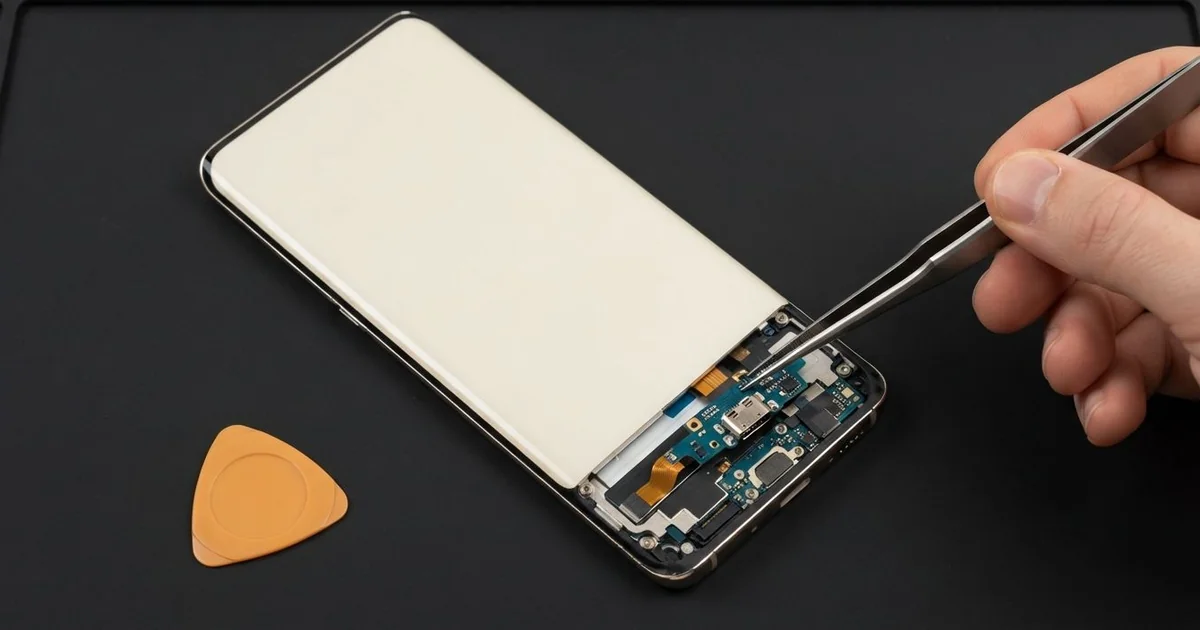
Samsung Galaxy S9+ Charging Port Repair in Al Khobar gets a phone charging properly again. We check the port free under a light, and many only need a careful clean. A damaged port gets a new port board, and most jobs are done the same day.
A Samsung S9 Plus not charging properly shows it in a few ways. The cable falls out, or only works when you hold it at an angle. Sometimes a water drop and a moisture detected warning appear, and charging stops.
Try not to live with it for long. Wiggling the cable wears the pins further, and a bad contact can get hot. If the phone shows a moisture warning, unplug it and let it dry.
Plenty of ports are just blocked. Pocket lint, sand and dust pack into the bottom and stop the plug going in fully. We lift it out with fine plastic tools, never with metal pins, and the plug fits snugly again.
A bent pin, a burnt contact or a cracked socket needs a new part. On this phone, the Samsung S9 Plus charging port sits on a small board at the bottom. We replace that board and test fast charging before you go.
How Kabayan Center Repairs a Samsung Galaxy S9+ Charging Port
We fix these charging faults on this model.
- A cable that is loose or falls out
- Charging that only works at one angle
- Slow charging, or fast charging that no longer starts
- A moisture warning that stays on when the port is dry
- A port that gets warm or smells burnt
- A phone that charges wirelessly but not by cable
Here is how we fix the port, step by step:
- We check the port free under a magnifier and test it with our own cable and charger.
- We tell you if it needs a clean or a new part, and you decide.
- For a blocked port, we lift out the dirt with fine plastic tools and a gentle cleaner.
- For a damaged port, we heat and lift the back glass, then unplug the battery.
- We take out the old port board and fit a new one in its place.
- We test cable charging, fast charging and file transfer to a computer.
- We seal the back with fresh glue, and you try it with your own cable.
Another phone with the same problem? Our charging port repair page covers other phones and laptops too. Our shop on King Fahd Road also serves customers from Dammam and Dhahran.
Why a Galaxy S9 Plus Stops Charging: 3 Real Cases
A hairpin pushed into the port
A parent came in holding the phone in one hand and a small hairpin in the other. A child had found the hairpin and pushed it into the port while playing. After that, the phone would not charge at all, from any cable in the house.
"It showed a warning and went dead the next day," the parent said. The metal pin had touched two contacts at once. That can short the port and bend the thin pins inside.
The parent had searched for Samsung Charging Port Repair in Al Khobar that same night. Under the magnifier, we saw one pin bent flat and a dark burn mark beside it. Cleaning wouldn't help, so we fitted a new port board.
The phone charged again, but the battery read very low and dropped fast. It had sat completely flat for days, and that hurts an older battery. We did a phone battery replacement too.
The phone now charges well and holds it through the day. The hairpins live on a high shelf now, out of small hands. The parent also bought small dust plugs for the port.
Charged while still wet from the pool
This one starts at a compound swimming pool. A lifeguard trusted the phone's water resistance and took photos in the water. At home, it went straight onto the charger while still wet, because the battery was low after all the photos.
A moisture warning appeared, but the lifeguard kept unplugging and plugging it in again. "I thought the warning was a mistake," they said. Charging a wet port pushes power through the water, and the metal starts to corrode.
Pool water has chlorine in it, which speeds up the damage. We found green spots on the port pins and white marks further inside. So we did a water damage repair on the board before anything else.
Then we fitted a new port board and resealed the back. Water resistance fades with age and after any opening. We asked the lifeguard not to swim with it ever again.
The phone charges normally now. The earpiece stayed a little quiet, because pool water had reached it too. The lifeguard decided to live with that for now, and uses the loudspeaker for calls.
A cable bent sideways while gaming in bed
We often see this one with people who game late at night. A university student played lying down, with the cable bent hard against the mattress. Night after night, the plug pressed sideways on the port.
Slowly the cable got looser, until it only charged when propped up on a pillow. The student had looked up mobile repair in Al Khobar between classes. "Is my battery dying?" was the first question.
The battery was fine, and it held its charge well in our test. The sideways force had cracked the tiny solder joints holding the port, so the contact came and went. We replaced the port board and tested fast charging several times, with the cable held at every angle.
During the test, we saw a small crack at the bottom of the screen. The phone had hit the bed frame one night, and touch was dead in that corner. A phone screen replacement fixed that too.
Now the plug sits tight and the phone charges fast. The student uses a cable with an angled plug and games sitting up. The phone stays on a pillow, not under it.
How to Keep Your Galaxy S9+ Charging Port Clean
- Keep the phone in a clean pocket, and shake out pocket lint now and then.
- Never push pins, toothpicks or needles into the port.
- Unplug at once when a moisture warning shows, and let the port dry on its own.
- Use a good cable, and pull it out by the plug, not the wire.
- Don't bend the cable sideways while you use the phone on charge.
- Use wireless charging for a while if the port feels loose, then get it checked.
- Bring it for phone repair in Al Khobar if the port feels warm or smells burnt.
Related services
- Motherboard repair for a phone that won't charge even with a new port
Questions about this repair
Ask us anything else on WhatsApp
we answer during shop hours.